


The era of "digital labels" has arrived. How can the printing quality of QR codes be ensured?
On September 8, the National Health Commission and the State Administration for Market Regulation jointly issued the "Announcement on Matters Related to the Implementation of Digital Labels for Prepackaged Foods (2025 No. 5)." This announcement provides further detailed explanations on the requirements for "digital labels" in the "National Food Safety Standard – General Rules for the Labeling of Prepackaged Foods" (GB7718-2025).
"Digital labels" use QR codes and other information-based display methods. When consumers scan the digital label QR codes, they can access label information through mobile devices such as smartphones.
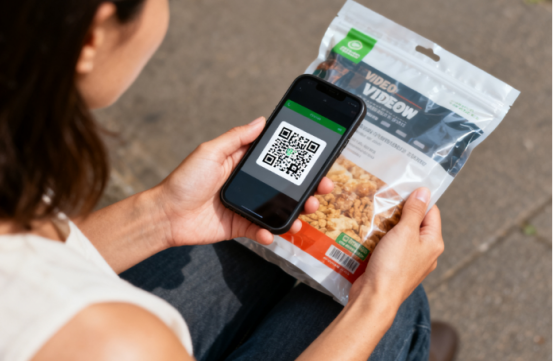
At present, the QR codes on product packaging have long become an important link connecting consumers, businesses, and regulatory authorities. Ensuring the quality, speed, aesthetics, and traceability of printed QR codes is an issue that printing companies must pay attention to during production.
Key Elements of QR Code Design
A good QR code design is the prerequisite for perfectly printed QR codes. During the design process, it is necessary to comprehensively consider the characteristics of the QR code as well as its printability.
01
Size
ISO/IEC 18004 Standard: The international standard for QR codes, which clearly specifies the size, error correction level, encoding method, and other aspects of QR codes.
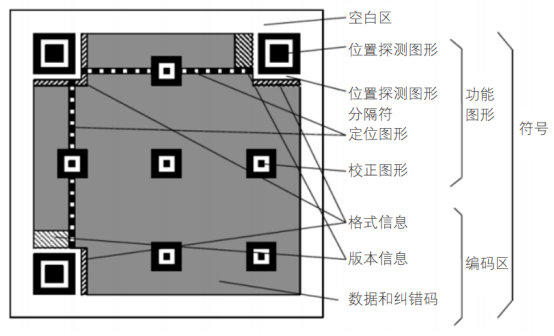
Module Size: A QR code is composed of several "square modules," and the size of each module determines the final overall size of the QR code.
It is generally recommended that the module size be no less than 0.25 mm to obtain clear and recognizable details at 300 dpi or higher resolution. Designing too small a size is a common issue. The recommended print size is >20 mm * 20 mm, and it should be adjusted according to the usage scenario.
02
Resolution and Clarity
Recommended print resolution: The common digital print resolution is 150–300 dpi. The higher the dpi value, the clearer the QR code details. In compact spaces, increasing the resolution can better ensure scanning efficiency.
03
Reasonable Use of Color
QR code scanning relies on color contrast recognition. The code color should be darker than the background (preferably black) and avoid using light colors for the code (such as white on white). When using colors, make sure there is sufficient contrast between the code and the background. Colors that are too similar are difficult to recognize in low light.

04
Printing materials and craftsmanship
Material types: Paper, plastic, self-adhesive labels, metal, and other materials can affect QR code clarity in different ways.
Post-processing steps: Lamination, hot stamping, and gloss may cause QR code reflection, color differences, or loss of detail, so testing and adjustments are needed during the design phase.
05
Manage content volume
Excessive content makes the QR code too dense and hard to read. When large amounts of information need to be carried on, dynamic codes are preferred over static codes.
Key control points for QR code printing
QR code printing mainly uses inkjet printing, which enables variable data processing functions that traditional printing does not have. It can effectively complete QR code printing. Compared to electrostatic imaging digital printing technology and direct printing machine imaging technology, inkjet printing offers unique advantages in terms of speed, cost, and quality.
01
Adjust the moisture content of the paper
If the moisture content of the paper is not properly adjusted, a newly printed variable QR code may be recognized by the QR code reading device, but after drying after storage, ink diffusion and paper shrinkage can cause the text and images to deform, affecting the recognition of the QR code reading device.
02
Ensure smooth paper operation
The distance between the paper and print head is generally about 2mm, but sometimes due to unstable tension in the roll paper feed or the flatness of the paper cannot be controlled within the appropriate range on the single paper feed platform, the distance between the paper and print head can change during printing, resulting in QR code weakness, broken threads, or scratches and dirt. To avoid this, it is best to choose paper that meets quality standards. Before printing, the paper should be leveled to remove powder and fibers, reduce surface roughness, and moderately stretch the paper during printing to further improve its flatness. Especially when the paper passes through the nozzle, it must not shake, and the distance from the nozzle must remain constant to prevent the printed QR code from floating on the paper surface.
03
Adjust parameters when the substrate changes
Since QR codes can be printed on various substrates, when the substrate changes, samples must be taken for testing, surface characteristics of the substrate analyzed, and technical parameters such as printing resolution and printhead temperature adjusted to meet production requirements.
04
Ensure registration errors
Mainly refers to color QR codes. When printing, the QR code must be neat and clear. Generally, we specify that the maximum registration error (the difference between the main color tone and the image) should be less than or equal to 0.4 times the nominal width of the narrowest line barcode. If the registration is inaccurate, the QR code will be difficult to recognize during scanning. Inaccurate QR code printing can also seriously affect production quality. Some advanced equipment can fully meet this standard, while some outdated devices, such as unstable overprinting, recommend using monochrome printing for the QR code.
05
The printing speed should not be too high
If a rotary inkjet printer with added printheads or a coding system is used to print QR codes, to ensure printing accuracy and improve the accuracy of subsequent inspection devices, the printing speed of the rotary inkjet printer should be controlled at 40~80m/min; otherwise, the product defect rate may increase. The nozzle resolution should be adjusted to 600 dpi × 300 dpi, and it is best to use disposable or new nozzles.
06
Control the ink volume well
The ink layer thickness should ideally be < 0.1mm; otherwise, the bars and spaces on different scanning planes may affect the normal reading of the QR code. To ensure the ink layer thickness is sufficiently thin, ink with good uniformity and diffusion should be selected, and attention should be paid to the compatibility between the ink and the substrate. Additionally, since ink flowability and other properties are closely related to ambient temperature, the amount of ink should be adjusted according to the ambient temperature. It is important to note that after drying, the QR code should reach over 90% dryness, and the dried QR code should not show any "tail."
07
Prevent content loss
Missing content during printing can make scanning difficult. During printing, due to paper and other issues, printed patterns are easily damaged. For QR codes, which are somewhat "fragmented" patterns, careful inspection during printing is necessary to avoid such issues.
08
Other precautions
When printing QR codes in batches, it is best to first scan the code with a QR code reading device, and only proceed with mass production after testing. After printing, store it as flat as possible to avoid distortion of the printed material.
The above are the key points to note during the QR code printing process, and are also key points for daily quality management for digital printing enterprises.