


How can digital printing do a good job with color management?
The Landa digital press, with its many advantages such as large format, high speed, wide color gamut, broad adaptability, eco-friendliness, and variability, has become one of the choices for many printing companies to handle quick, short-run orders. How to seamlessly switch between traditional offset printing and digital printing through color management is a pressing practical issue for many print companies. My company introduced a Landa digital press in 2022 and has summarized some experiences in transitioning from traditional offset to digital printing.
Basic Concepts of Color Gamut Space
Before switching between different devices, it's necessary to understand some standard overviews. The International Color Consortium (ICC) sets internationally recognized standards for color management to accurately define device color characteristics, known as 'ICC profiles.' Each device has its own unique color performance, and an ICC profile contains the following information.
1. Color Space Characteristics
Color space describes the color gamut of a device, meaning the range of colors that the device can capture or display. Since the Landa digital press uses seven colors (CMYKBGO), its color gamut is larger than that of traditional offset printing (CMYK). A comparison of the Landa digital press's color gamut with Fogra39 and GRACoL2013 gamuts is shown in Figure 1, indicating that the Landa digital press's color gamut is much larger than the Fogra39 and GRACoL2013 gamuts.
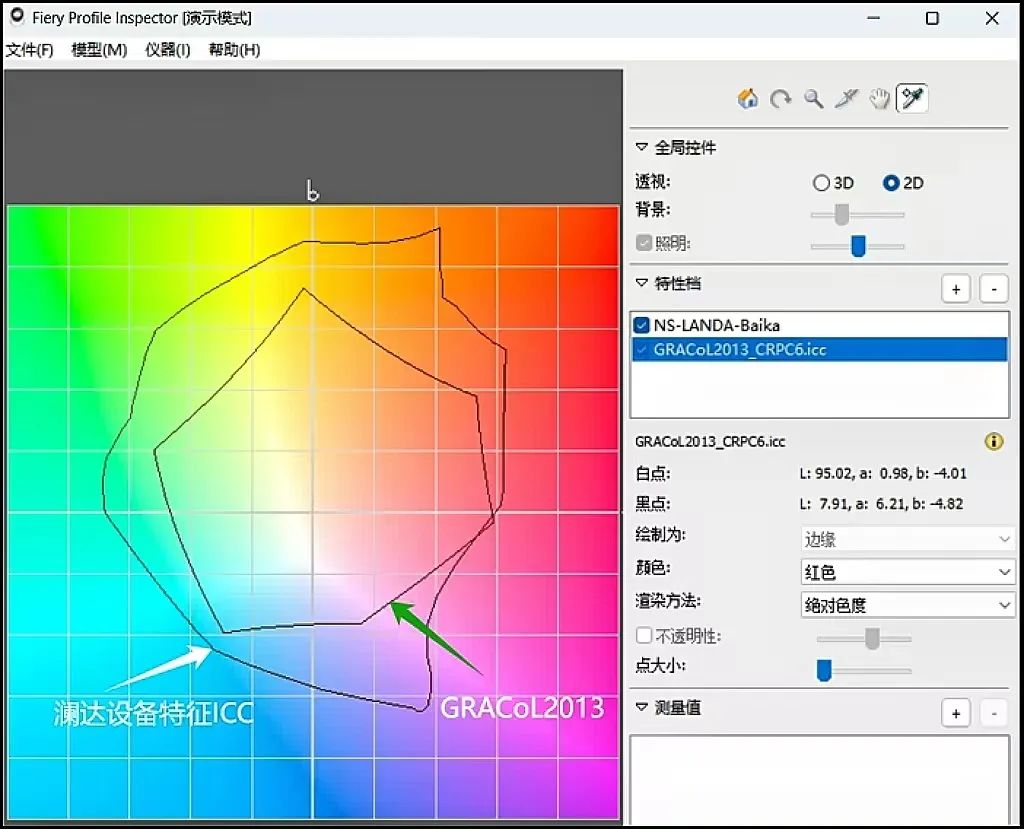
Landa digital press color gamut
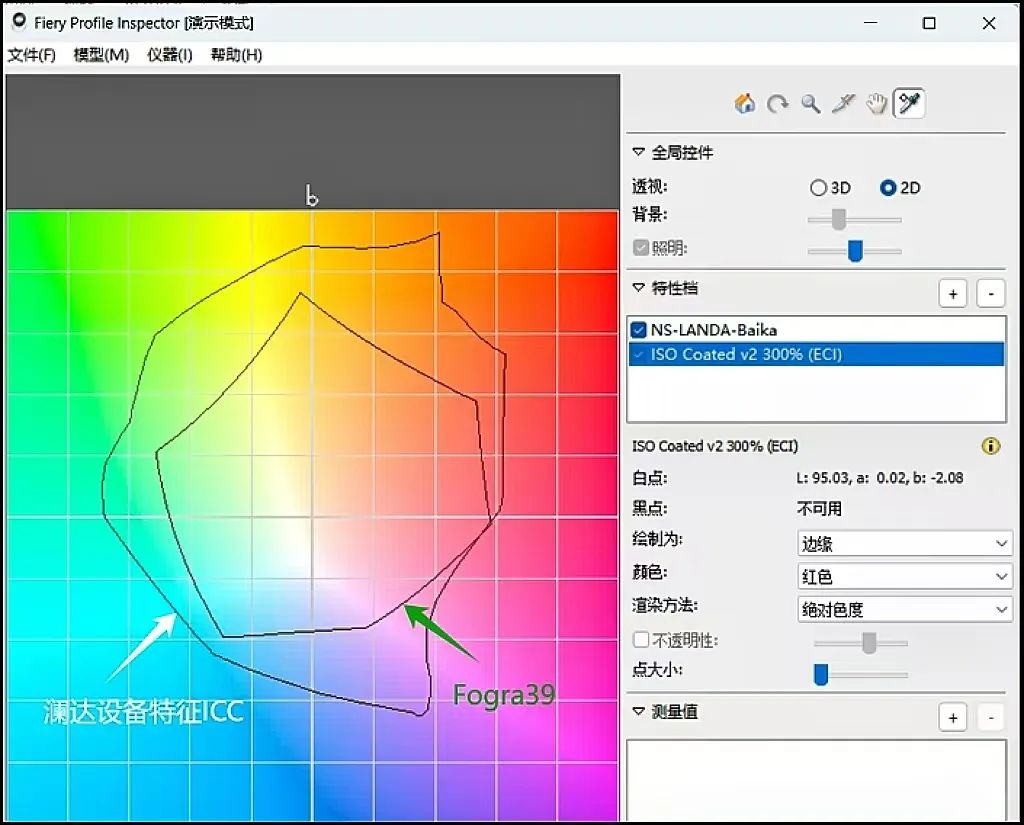 Fogra39 and GRACoL2013 Color Gamut
Figure 1 Gamut Comparison
2. White Point
The white point refers to the defined position of white in the color space. It determines the color representation of the brightest part of an image (usually white). It plays a key role in accurate color reproduction and maintaining color consistency, and it's also an important reference for evaluating device color performance.
3. Gamma Curve
The gamma curve describes the nonlinear relationship between the input signal (usually brightness values) and the output information. It is mainly used to adjust the brightness output of devices like monitors and affects how dark and bright areas of an image are displayed.
4. Color Conversion Table
A color conversion table can establish a mapping between the color spaces of the source device and the target device.
Understanding the basic principles of color management is very important for our subsequent file processing. Since the Landa digital press has a large color gamut and high saturation, the color gamut of traditional offset printing cannot reach it. If orders are large, and it might later return to traditional offset production, we need to prepare files in advance. This means doing small batch proofing and production using the smaller gamut of the Landa press, finding the corresponding positions of the original colors within the Landa press's gamut so that it will be easier to match colors when switching back to traditional offset printing in the future.
Establishing the Gamut Space of the Landa Digital Press
We use professional color management software systems like ORIS CGS X Gamut or EFI Fiery to quantify and collect device characteristics. Before this, the device must be standardized and calibrated.
1. Collect Device Profile ICC: EFI Fiery Color Matching Method
Use the Color Profiler Suite (CPS) in EFI Fiery that comes with the Landa digital press to collect the ICC. By collecting using CMYKOGB 7C, we obtain the maximum gamut space of the device, which represents the Landa digital press's device profile ICC.
The ICC collection process in the CPS manager of EFI Fiery is wizard-guided. Launch the calibrator function and complete the steps as follows:
Step 1: Linearization (check and correct device status);
Step 2: Ink limit (for Landa digital press, only up to 220%);
Step 3: Color reference (check if the 7C tonal curve match looks natural);
Step 4: Maximum gamut collection (2700 color patches).
All four steps must be done for each type of paper (the principle is if the Delta of paper white difference >3, it must be done). This ensures that the gamut for each paper type is accurately collected, and the collected ICC can simulate the color target.
The targets include spot colors and the printing standards pursued. This method does not follow the color cycle target process but uses the CMYKOBG-CMYK one-time conversion method to reach the target space at once, achieving Fogra39, Fogra51, or GRACoL2006, GRACoL2013 targets. Since the Landa digital press 7C gamut completely encompasses all color spaces based on the traditional ISO 12647-2, EFI Fiery's powerful algorithms can accurately simulate in just one step, and practice has proven this.
2. Matching Color Standard Targets
The CMYK target ICC in EFI Fiery must correspond with the ICC of the actual paper used. If the purchased paper completely matches the standard paper white, the corresponding Fogra or GRACoL standard can be used directly. Otherwise, it is recommended to modify the target ICC according to the actual paper white, then generate a new ICC for application. The color parameter settings are shown in Figure 2.
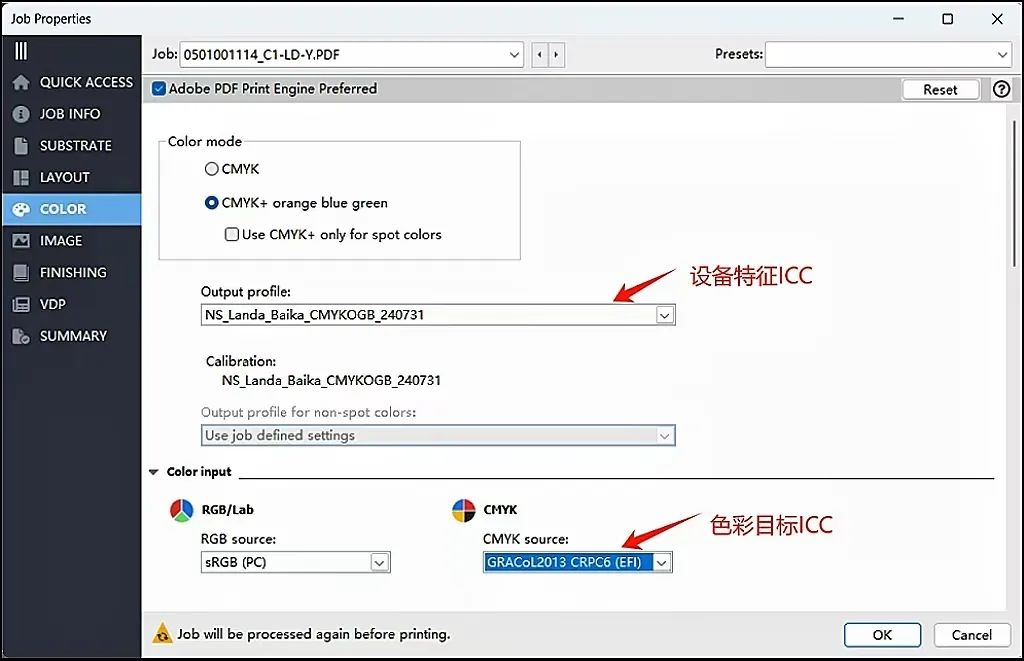 Figure 2 Color Parameter Settings in EFI Fiery
By correctly setting and printing the TC1617 chart, professional color evaluation software like Curve can be used to check whether the print targets meet all the indicators. We verify using the IDEAlliance G7 standard. A final PASS indicates that all color metrics meet the standards and comply with the color targets.
At this point, printing production can be carried out according to the matched color targets.
Establishing Traditional Offset Color Gamut
This requires a professional color management software system like ORIS CGS X Gamut. The method is basically the same as the process for Landa digital printing, so it won't be repeated here.
Transitioning Between Digital Printing and Traditional Offset
CMYK Four-Color Overprinting Matching Methods
1. First Production of a New Order
For a new order, there is no need to compare the color of old and new products for the customer, which makes it relatively easy to handle. The main consideration is whether it will need to be converted back to offset printing in the future. Initially, it's important to check if the customer requires European standard Fogra39, Fogra51, or U.S. standard GRACoL2006, GRACoL2013 targets. If future conversion to traditional offset is needed, choose a small gamut ICC for production; otherwise, just use the Landa digital printer ICC to enjoy the widest range of saturated color effects.
2. Converting Traditional Offset CMYK to Digital Printing
Our company currently uses the CGS color management system. First, we pre-adjust the file colors with Epson's digital proofing system at the prepress stage. Once both visual checks and data measurements pass, the file is then sent to the Landa digital printer for imposition and production.
Here, we use the ICC files we previously created for traditional offset and Landa digital printers. CGS software helps find the corresponding relationship between the Landa digital printer and traditional offset color spaces, directly matching the Landa printer's ICC gamut to the print target ICC, i.e., Landa digital printer 7C.icc -> CMYK.icc. Because the Landa printer's color gamut is large enough, a matching relationship can always be found within its entire color space. The current color management process is highly intelligent, and following the standard procedure can achieve the desired results.
3. Converting Traditional Offset Spot Colors to Digital Printing
The ink used by the Landa digital printer can reproduce 96% of the international Pantone color library, and the color difference can be optimized to below 2. Using CGS X Gamut, spot colors can be pre-matched, assessing before production whether a full match is possible and identifying the 4% of colors that cannot be matched in advance.
Because different papers have different Lab values, this affects the final spot color results. We've previously established ICC files for various types of paper and set up corresponding paper conversion queues in CGS X Gamut, which effectively leverages the software's adjustment capabilities to manage spot colors.
In CGS X Gamut, you can select the spot color correction method (see Figure 3). The device profile represents the maximum color gamut for the current paper. By choosing the unique calculation method for spot colors, the opposing colors in CMYKOGB separation can be excluded to simulate the target colors. On this interface, users can also pre-assess the standard and strict color difference values in the color library. As shown in the red box in Figure 3, out of 2,161 Pantone spot colors, 96.02% fall within a standard color difference of 3.5, and 90.745% fall within a strict color difference of 2.
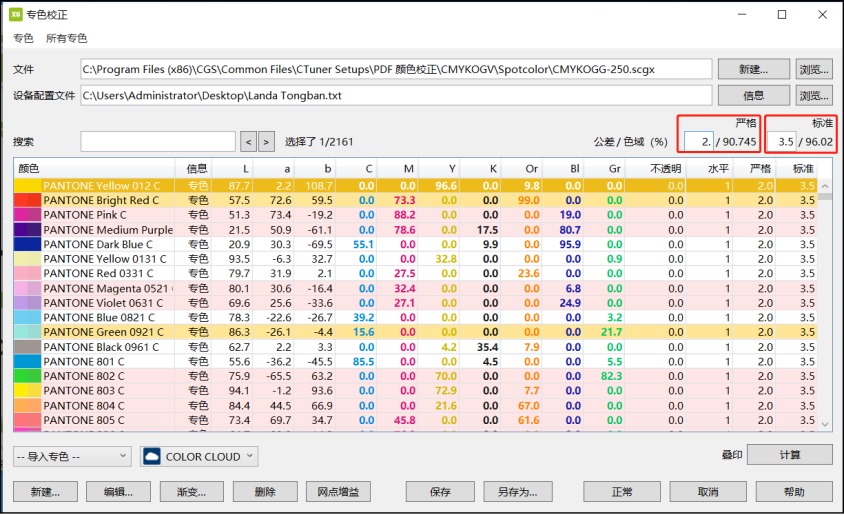
Figure 3 Spot Color Correction
Double-clicking on a spot color allows you to view and edit the specific formula values and delta E of the spot color. You can also fine-tune the ratio of any color. If the delta E is less than 1, it means that after printing with the Landa digital press, the spot color can meet color matching requirements, and the delta E meets the color matching standard. Using the simulation function of professional software, you can print N spot colors on a single sheet of paper without incurring extra costs, which is a huge efficiency boost for printing companies.
Besides making predictions in advance with CGS X Gamut, if there are still slight differences in actual production, you can fine-tune them using EFI Fiery in Landa digital printing to achieve the best results. The actual fine-tuning results can also be fed back into CGS X Gamut for corrections, so that the next production can print spot colors with a better match according to the normal process, as shown in Figure 4.
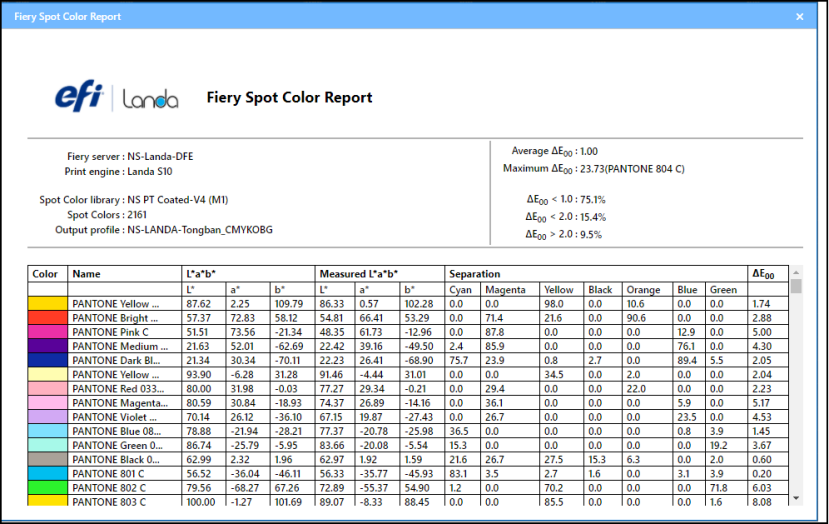
Figure 4 Color difference is less than 1 after spot color adjustment