


Don't let the prepress process slow down again! Our self-developed tools have increased efficiency by nearly 10 times
Development Background: Originating from actual production needs
Prepress document processing in digital printing takes up too much time. After communicating with frontline operators, three core needs were identified and clarified.
(1) Batch check document page count: During printing and layout, it is often necessary to ensure the document has an even number of pages; otherwise, it can easily lead to waste of printing materials or binding errors.
(2) Automatic handling of odd-page documents: For documents with odd pages, blank pages must be added at the end, while even pages remain unchanged.
(3) Batch check whether text is curved: To avoid printing errors caused by missing fonts, confirm that the text in the document has been converted to curves (i.e., "curved").
Through research into Adobe Acrobat and various PDF processing plugins on the market, it was found that existing tools are either functionally redundant and complex, or do not match the company's actual production processes, especially with hidden risks in the security of inversion processing. More importantly, similar domestic tools often require payment, resulting in higher long-term usage costs. Based on these practical issues, the company decided to develop a lightweight, precise, and internally tailored specialized tool.
PDF page count checking and processing tool
01
Core functions and judgment logic
The core goal of this tool is to ensure that all documents to be printed have an even number of pages. The judgment and execution approach are as follows.
(1) Page detection mechanism: Reads the metadata of PDF documents via the PyMuPDF library to directly obtain total page information.
(2) Parity Logic Judgment: Use modulus operation (page number %2) to determine parity. If the result is 1, it is determined to be odd pages; if it is 0, it is considered to be even.
(3) Differentiated processing strategy: For odd-numbered pages, automatically add one blank page at the end of the document that matches the original document size; For even-page documents, keep the content unchanged and copy directly to the output directory.
(4) Security Handling Principle: All processed documents are saved to the designated "Processed Files" directory, with the original files preserved to avoid file damage caused by misoperation, as shown in Figure 1.
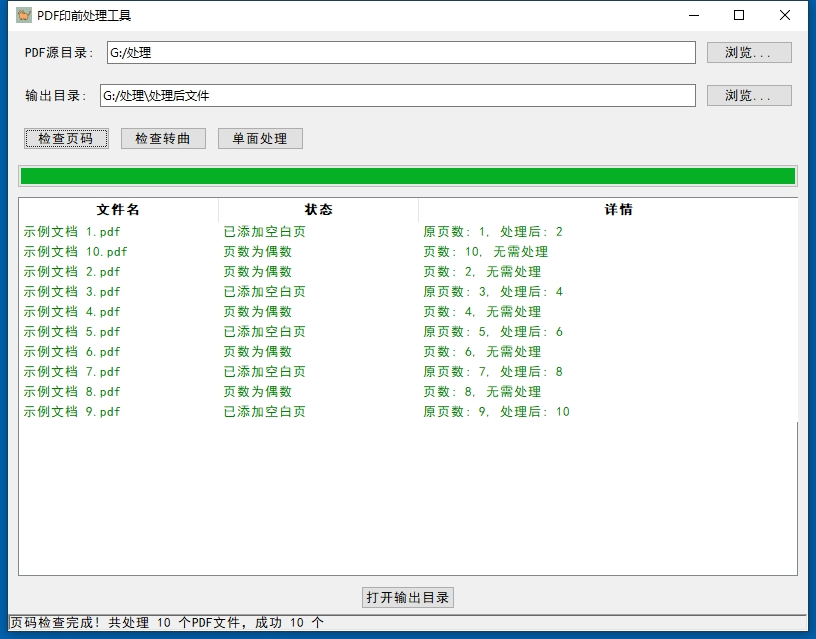 Figure 1 PDF Page Count Check and Processing Tool Interface
02
Technical Implementation Points
The tool uses Tkinter to build the graphical interface and mainly includes three functional modules.
(1) Directory Selection Module: Supports visual selection of the source file directory and the output directory, with the default output directory being a subfolder under the source directory.
(2) Batch Processing Module: Uses multithreading technology to perform background processing, avoiding interface freezes, and simultaneously displays processing progress in real time through a progress bar.
(3) Result Display Module: Presents the processing results of each file in a table format, including the original page count, processing action, and status information, distinguishing successful and failed states by color.
PDF Curve Conversion Check Tool
01
Core Functions and Judgment Logic
The curve conversion check tool focuses on determining whether the text in a document has been converted to curves. Its core judgment logic is based on analyzing the font information in the PDF document.
(1) Text Existence Detection: Determines whether the document contains editable text by extracting text from the pages.
(2) Font Information Analysis: Parses the list of embedded fonts in the document. If font information exists, it indicates that the text has not been converted to curves.
(3) Comprehensive Judgment Rules: If there is text content and no font information, it indicates the text has been converted to curves (green mark); if there is no text content, no conversion is required (green mark); if there is text content and font information, the text has not been converted to curves (red mark), as shown in Figure 2.
This tool is specially designed in a 'check only, do not convert' mode. The main reason is that, according to operator feedback, performing curve conversion on files containing official seals may easily cause the seals or other graphics to be lost, so the tool retains only the checking function.
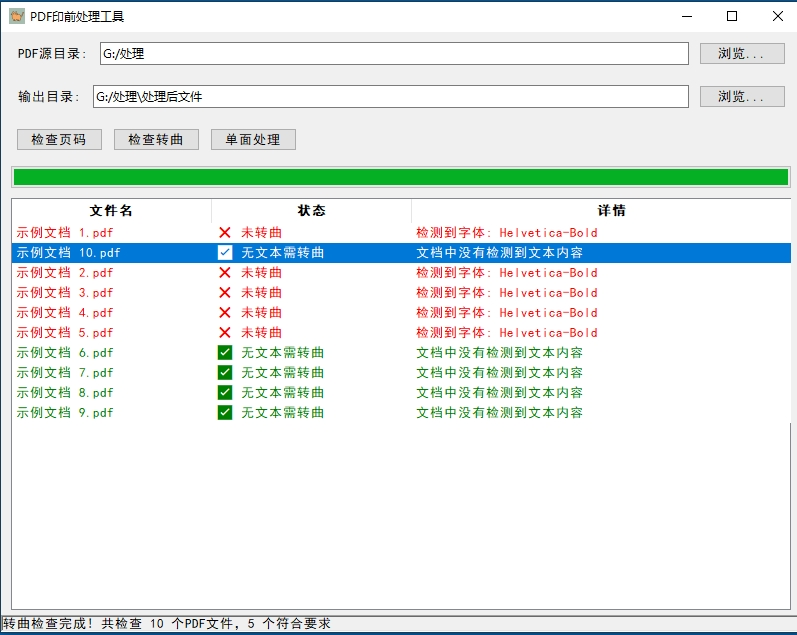
Figure 2 PDF Curve Checking Tool
02
Key technical implementation points
This tool also uses Tkiner to build the interface, with three key technical points.
(1) Font information extraction: Using PyMuPDF's text block analysis function, obtain all font names and their occurrence counts in the document.
(2) Result visualization: Use tree views to display inspection results, intuitively distinguishing different states through colors and icons.
(3) Status Statistics Function: Automatically calculates the number of documents that meet requirements, helping operators quickly grasp the overall inspection status.
Challenges and solutions during the development process
As a non-professional developer, I encountered many technical challenges during tool development. The specific problems and solutions are as follows.
(1) PDF parsing depth issue: The initial PDF library could not accurately extract font information, but after AI suggestion, switching to the PyMu PDF library resolved the issue.
(2) Interface lag issue: When processing large numbers of files in batches, the interface often becomes unresponsive. Under AI guidance, a multithreaded processing solution was implemented, effectively resolving this issue.
(3) Chinese garbled text: By configuring font parameters and encoding settings, the issue of garbled Chinese characters displayed in interfaces and exported files is resolved.
(4) Exception handling mechanism: To address the issue of program crashes caused by corrupted PDF files, the exception capture mechanism has been improved to ensure that a single file failure does not affect the overall process.
Throughout the development process, AI tools played an important role as technical consultants, not only providing key code examples but also explaining the principles of PDF file format parsing, helping developers quickly grasp specialized knowledge.
The value and outlook of tool applications
The application of these two tools has brought significant efficiency improvements to production work, specifically reflected in the following two aspects.
(1) Time cost savings: Manual inspections that used to take 1 hour can now be completed in 5 minutes, increasing efficiency by nearly 10 times.
(2) Improved quality stability: Effectively avoids oversights from manual inspection, ensuring consistent printing quality.
Documenting the development process of these two gadgets aims to convey the work philosophy of "exploration and innovation," focusing on solving specific problems in actual production, optimizing traditional workflows through technical means, and ultimately achieving cost reduction and efficiency improvement.