


Comprehensive Guide! Standard Operating Procedures for Using Anilox Rollers, a Must-Learn and Must-See!
Anilox rollers are the 'heart' of flexographic printing presses, and their condition directly determines printing quality and production costs. To standardize the operators' procedures, extend the service life of anilox rollers, and ensure printing quality, my organization has established regulations for the use and maintenance of anilox rollers. I am sharing them here for reference, hoping to raise awareness among more label printing companies about the proper use and care of anilox rollers.
PART 01
Requirements and Precautions for Using Anilox Rollers
1. Inspection Before Use
1.1 Roller Surface Inspection
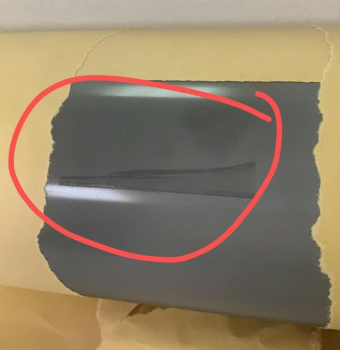
Before use, inspect the roller surface visually in good lighting and with a flashlight to ensure it is free of oil, dry ink, foreign matter, clogged cells, and scratches. As shown in Figure 1, oil contamination was found on the roller surface during the pre-use inspection.
It should be noted that inspecting the cells of ceramic anilox rollers usually requires a magnifying glass of more than 200x. For anilox rollers with more than 1000 LPI, if the cells are clearly visible to the naked eye, a magnifying glass of more than 400x is generally needed.
2. Bearing Inspection
Manually rotate the bearing to ensure it turns smoothly without any sticking or abnormal noise. Check the bearing clearance (axial clearance >0.1mm requires immediate replacement). It is recommended to use sealed bearings to resist corrosion from ink and cleaning agents.
3. Parameter Verification
Before mounting the anilox roller, verify that the line count (LPI) and volume (BCM) of the anilox roller match the current production order requirements to prevent using the wrong roller. It is recommended that the actual number of the anilox roller be clearly specified on the production order, as the BCM volume on the roller may have manufacturing tolerances. Record the actual anilox roller number each time a sample is made and strictly use the same numbered roller when placing the actual order. If a roller is damaged and needs to be replaced, retesting and adjustments are necessary to avoid inconsistencies in color even when using rollers with the same parameters, which would waste time and materials.
II. Installation and Commissioning
1. Standardized Installation
Use specialized tools (such as a hydraulic sleeve) for installation. Do not strike or hammer the rollers to avoid damaging the roller core or bearings. Ensure the contact surface between the roller body and the wall plate is clean and the roller is installed smoothly.
2. Pressure Adjustment
First, adjust the doctor blade pressure, which must be done after the anilox roller has been coated with ink. While ensuring even ink transfer, use a spring scale or electronic pressure gauge to adjust the line pressure to the recommended range of 2.8g/cm to 5.6g/cm, following the principle of "minimum required pressure." Next, adjust the ink transfer pressure so that the contact pressure between the transfer roller and the anilox roller is 0.2–0.3MPa.
3. Runout Testing
After mounting a new roller or after major equipment maintenance, use a dial gauge to measure the radial runout of the anilox roller, ensuring the value is ≤0.025mm. If it exceeds this range, check for issues with the bearings, shaft ends, or wall plates.
III. Production Monitoring
1. Temperature Monitoring
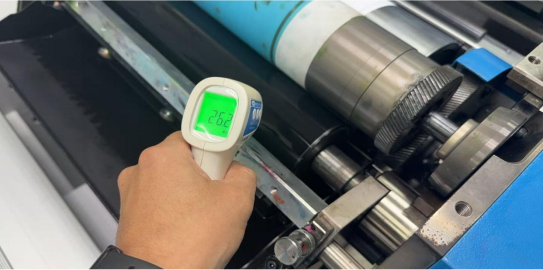
During production, use an infrared thermometer to regularly monitor the surface temperature of the anilox roller (as shown in Figure 2) to ensure it stays ≤35°C. If the roller surface temperature is too high, it can cause changes in ink viscosity, color inconsistency, and accelerate clogging of the cells.
2.Quality Control
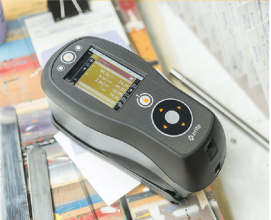
It can be divided into visual inspection and instrument inspection. During visual inspection, the roller surface should be continuously monitored to ensure even ink transfer, and to check for any abnormalities such as streaks or ghosting. Instrument inspection requires regular sampling of printed materials using a colorimeter (as shown in Figure 3), with the density difference on the same plate not exceeding 0.3.
3.Scraper System Maintenance
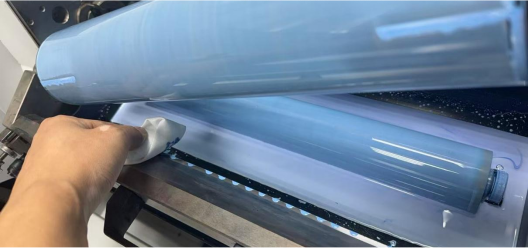
Closely monitor the condition of the scraper to prevent impurities from accumulating between the scraper and the roller surface, which can cause a 'sandpaper effect' that wears down the roller surface. If abnormal lines are detected, the machine should be stopped immediately to check the scraper edge and pressure. It is recommended to clean the scraper and roller after long shutdowns or during shift changes, and to use a 'lint-free cloth' to promptly remove impurities from the scraper edge, as shown in Figure 4.
四,Handling and Storage
1. Handle with Care
When taking or moving patterned rollers, always hold the shaft ends with both hands, handle them gently, and strictly prevent the roller surface from colliding or rubbing against any hard objects (equipment, tools, or other rollers).
2. Professional Storage
Rollers must be stored vertically on a dedicated rack to avoid bending or deformation caused by placing them flat under pressure. Operators must wear clean gloves before touching the roller body to prevent sweat or grease from contaminating and corroding the roller surface. The storage environment should be kept dry and clean. It is recommended to use protective covers on the surfaces of the patterned rollers during machine installation, removal, and storage to reduce the risk of damage from accidental collisions.
Due to the length of the content, for easier reading, the author shares this section on "Requirements and Precautions for Using Patterned Rollers" and hopes it can be helpful. In the next issue, we will take a look at how to properly maintain the patterned rollers.