


Adjust the printing file to resolve the ghosting issue caused by cut-and-paste blank areas in printing.
In recent years, with the continuous increase in material costs, the industry has been constantly exploring how to save materials through design innovation, process improvement, and equipment adjustments, and how to make full use of materials within a limited area to reduce costs.
Due to characteristics such as large print volumes and high quality requirements, cigarette packaging products have seen innovation deeply applied in every detail. For instance, adjusting cigarette pack carton printing from sequential to nested imposition can clearly illustrate this issue, and this method has been accepted and implemented for improvement by many peers, as shown in Figure 1.
As shown in Figure 1, when arranging large printing plates, choosing the nested imposition method for production is one effective way to save materials. However, during actual production, printing quality issues that are difficult to avoid may arise due to the structural characteristics of the printing equipment itself, such as plate ink build-up, ghosting caused by water, and color differences. This requires us to achieve the desired effect of the original design or standard through optimized design processes.
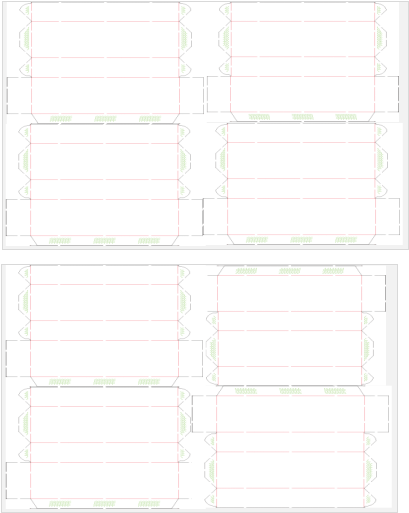 Figure 1: Immediate Material Savings Achieved by Switching from Sequential to Insert Printing for Cigarette Pack Cartons
In this article, the author will use a certain cigarette product carton as an example to analyze design and process improvements and the production implementation process. This product features a large-area solid blue background with bright colors, full gloss, and clear layering. Considering that in the printing process, the offset printing ink layer is thin and the coverage of light-colored ink is weak, the product's printing effect is achieved through three-color overlay printing (dark blue, light blue, and warning blue). Because the insert printing method is used, there is a hollow pattern design in the middle of the large solid area and blank areas at the box adhesive positions. During printing, this can lead to issues such as ink buildup on the plate, ghosts, and color differences. This article provides an approach for industry peers through process analysis, layout design adjustments, and verification by trial printing.
Analysis of Light-Colored Ink Printing Process
Offset printing involves a long ink path where ink is transferred through inking, spreading, distributing, and multi-roller coordination to achieve an even and smooth ink layer on the printing plate, resulting in a uniform ink amount and clear print. By using the principle of ink-water repellence, ink adheres to the image areas of the plate while the blank areas remain ink-free, thus transferring ink onto the substrate.
Due to the different layout in insert printing products, the adhesive positions on the cigarette carton body do not require printing, leaving blank areas in the middle. Since no ink is applied to the blank areas, ink can accumulate at these unprinted sections on the plate and fail to transfer effectively. Under printing pressure, the ink can only spread along the ink path outward, leading to plate contamination, ink-water imbalance, and observed phenomena such as uneven color at the left and right sides of printed areas. In more severe cases, the printed substrate surface may show ink buildup, scumming, ink streaks, ghosts, and color differences, as illustrated in Figure 2.
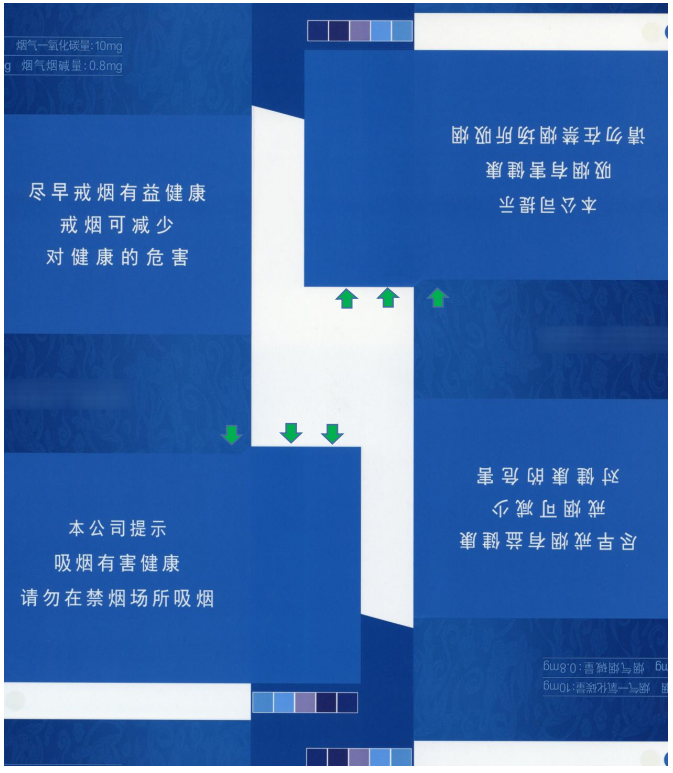 Figure 2 shows uneven depth of the prints at the ears, with noticeable ink stripes and ghosting.
To address the above issues, common solutions include material improvements, adjustments to printing equipment, and modifications to the printing design file. A relatively effective approach is 'less blocking, more distributing.' This involves adding color blocks in the design file to ensure that even the blank areas in the layout receive some ink. This helps resolve difficulties in ink transfer during printing and problems of ink accumulation on the printing plate.
Design File Adjustments and On-machine Product Verification
Adjustments to the printing file combined with on-machine verification are carried out in three different schemes, with the printed results compared for each.
Scheme 01
In the layout, insert square color blocks in the blank positions and fill other blank areas with solid color blocks. Also, add color strips to the gripper margin and the tail end blank areas to solve the problem of ink layer accumulation, as shown in Figure 3.
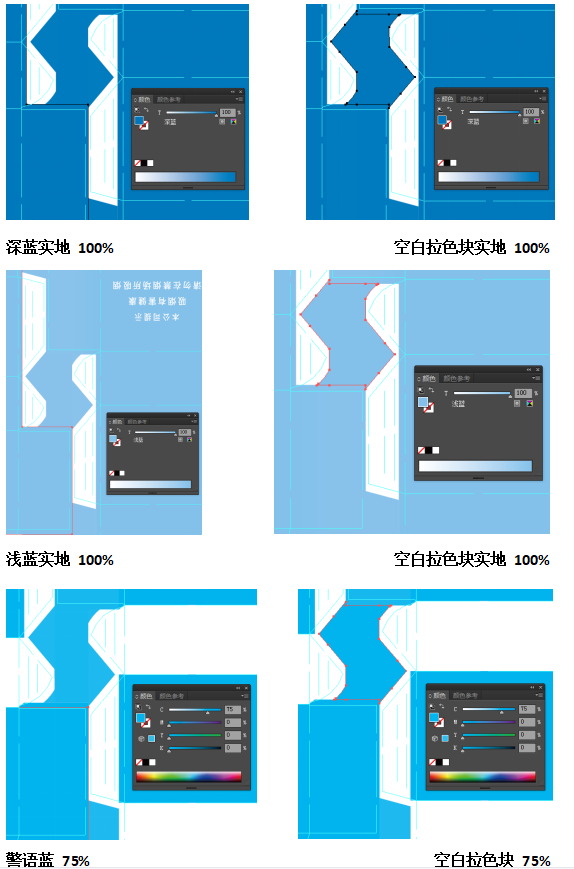 Figure 3: Ratio of dot patterns for inserted positions on ears and blank color blocks
The above方案 showed some improvement in terms of dry/wet surface, dirty plates, ink streaks, and ghosting during machine printing. However, at the ear areas, the color blocks corresponded to the positions below where there was no printing due to adhesive, resulting in one spot being darker and the other lighter. The color difference was visibly noticeable. Through on-site process analysis, we made detailed adjustments.
02 Scheme Two
Split the color block at the ear into two parts and adjust the dot size of the halftone screen separately to control the shade-reducing dots in darker areas and increasing dots in lighter areas. At the same time, maintain consistent dot sizes between each color block and the corresponding irregular squares above and below to ensure a smooth ink layer transition, preventing obvious visible color differences in printed illustrations, as shown in Figure 4.
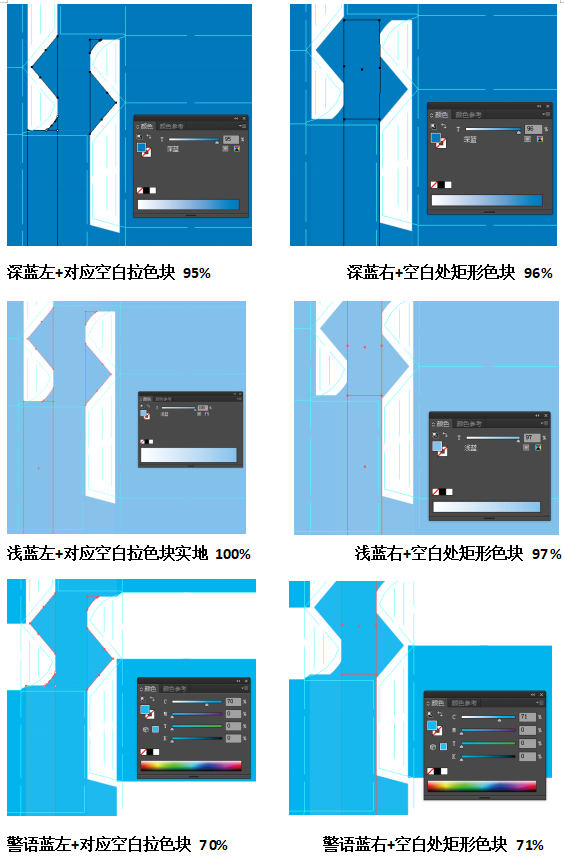 Figure 4 Proportion of spots in the interlocking area of ears and blank color blocksIn the above scheme, the color difference at the ears was somewhat improved during the machine processing. However, the colors on both sides of the connection between the ears and the warning area (crease line) were uneven, with one side darker and the other lighter, as shown in Figure 5.
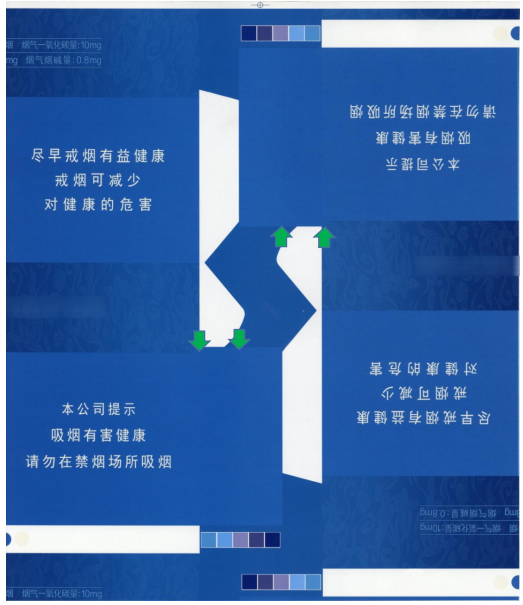
Figure 5 Variation in Darkness at the Ear Area and Intersection with the Warning AreaAnalysis shows that the offset ink is distributed evenly during the inking process. Since the color blocks beside the adhesive area are square, and the ear area is divided into two color blocks with differently sized halftone dots, there is an uneven transition between the left and right halftone dots of the ear area as well as at the junction between the product warning area and the ear (at the crease line). This results in inconsistent ink layer thickness on both sides of the junctions, causing variations in color darkness.03 Solution ThreeAdjust the printing file by shrinking the sides of the square color blocks beside the adhesive area toward the center of the square, forming two curved edges. This ensures a smooth transition between the two halftone blocks of different dot sizes in the ear area. In this way, the accumulated ink can undergo a buffer process along the curved edges, following a sequence of release, compression, and release. This alleviates the contrast caused by the distinct halftone layering, as shown in Figure 6.
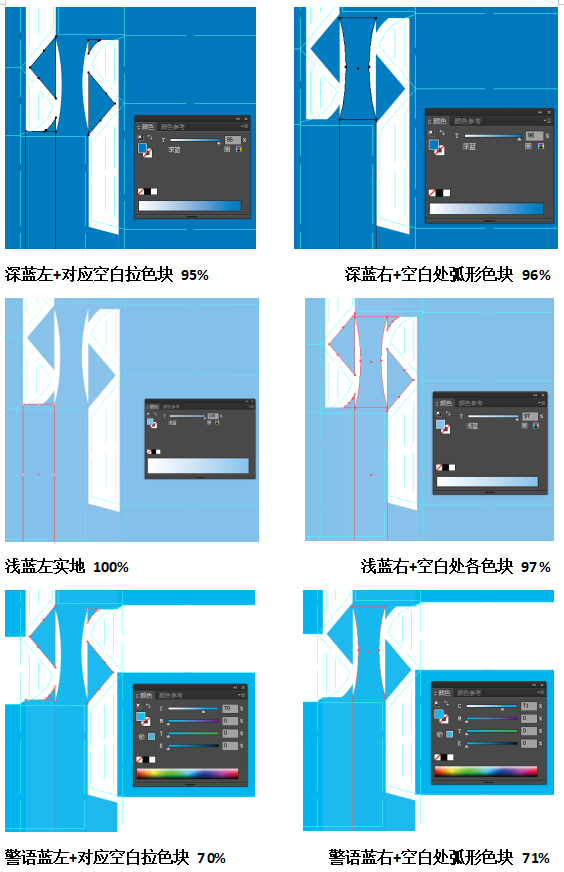
Figure 6 Dot Proportion of Inserted Position Ears and Blank Color Blocks
From the test results of Plan 3, issues such as variations in color depth, ink streaks, and uneven transitions have been greatly improved. The dot printing marks on the substrate surface are clear, and the printing tonal reproduction performance is good. After subsequent production testing, the quality is stable, effectively solving the problems mentioned at the beginning of the article, thereby achieving the adjustment practice from sequential splicing to inserted splicing, as shown in Figure 7.
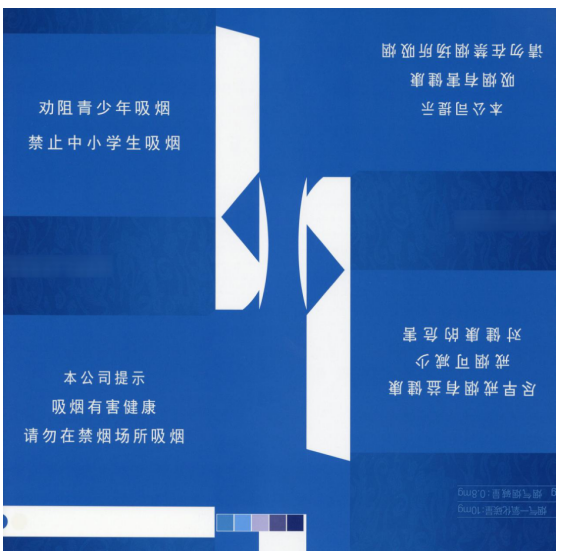
Figure 7 Color Difference Stability, Even Ink ToneIndeed, in many printing and reproduction processes, completely eliminating variations in light ink, differences in color depth in large-area designs with cutouts, and ghosting is almost impossible. However, there are numerous ways to reduce or avoid the occurrence of uneven color, ghosting, and other issues, such as regular maintenance of equipment to ensure performance stability; maintaining a stable production environment (temperature, humidity, cleanliness); improving the printing adaptability of substrates; processing of printing design files; and enhancing the printing process judgment skills of designers along with proficient file processing techniques. This article aims to provide readers with a small inspiration, hoping to offer a starting point for further ideas.