


A Must-Read for Offset Press Operators: 4 Key Points to Solve Ink Color Deviation in Printing!
During the offset printing process, color variations are fairly common and can be caused by a variety of factors, such as improper machine adjustments, insufficient ink supply, changes in water levels, or poor paper quality. This means the press operator needs to make precise adjustments based on the specific cause to ensure stable and consistent ink color.
Analysis of Ink Color Variations
01/ Ink Supply Issues
Insufficient or uneven ink supply is one of the common reasons for color changes. This could be due to a low ink level in the ink fountain, incorrect speed of the fountain roller, or blocked ink paths. For example, if the fountain roller rotates too slowly, the ink transfer decreases, making the color lighter; if it rotates too quickly, too much ink is transferred, making the color darker.
Additionally, improper pressure adjustment of the oscillating roller can also cause ink supply problems. Each time the fountain roller rotates, the oscillating roller contacts it once, then swings to transfer ink to the transfer roller. Over time, during printing, the pressure of the oscillating roller changes. If the contact pressure with the fountain roller is too high and with the transfer roller too low, the ink won't transfer. But if the contact with the transfer roller is too high and prevents effective contact with the fountain roller, ink still won't transfer. In such cases, the operator needs to adjust the pressure of the oscillating roller properly. If the pressure is already adjusted to a large extent but the contact pressures between the oscillating roller, fountain roller, and transfer roller are still not correct, then check these three aspects:
① The oscillating roller has worn down and become smaller. Normally, the diameter is 59.5mm, and if it's worn by more than 1.0mm, the pressure adjustment will definitely be affected.
② Screws or parts in the oscillating roller adjustment mechanism are worn (see Figure 1), which prevents proper pressure adjustment and requires replacement of the parts.
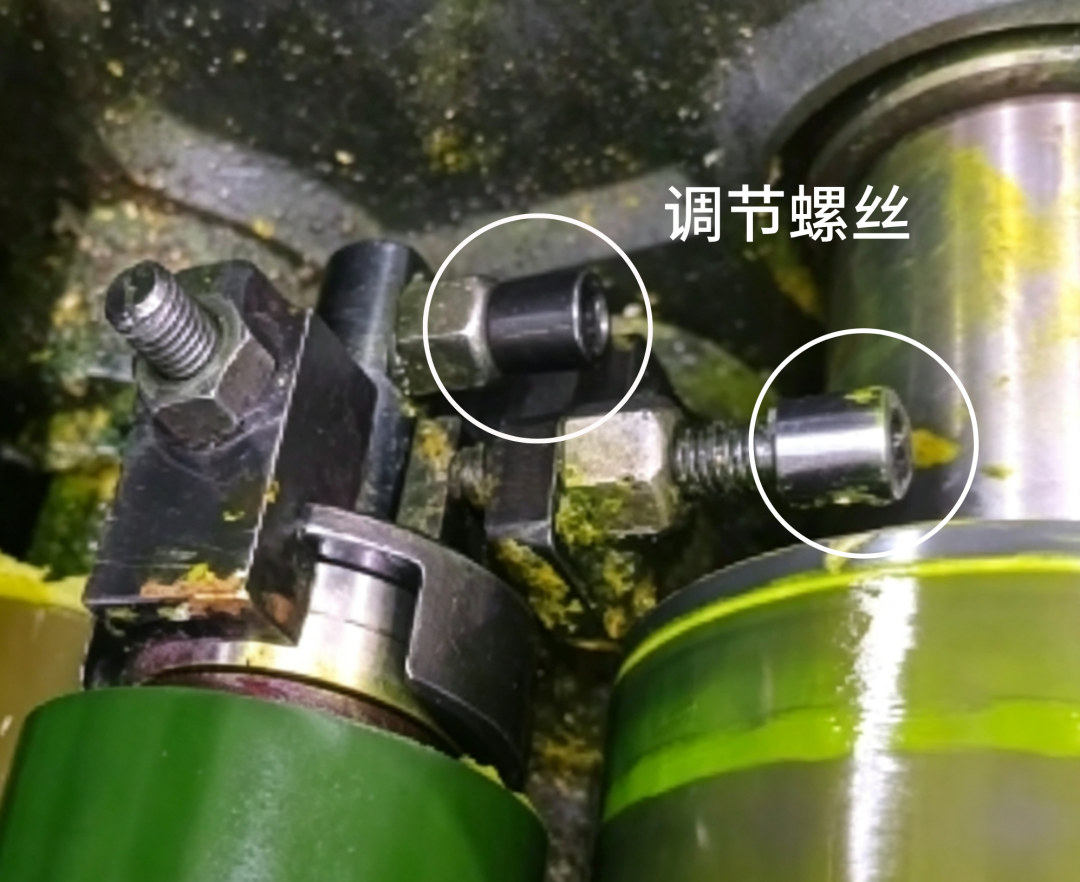 Figure 1 Ink Roller Adjustment Mechanism
③ The ink adjustment mechanism needs to be greased with a special oil gun every month (Figure 2) to keep it lubricated. If it's low on oil, the internal parts will wear out faster, and the pressure won't be able to adjust properly.
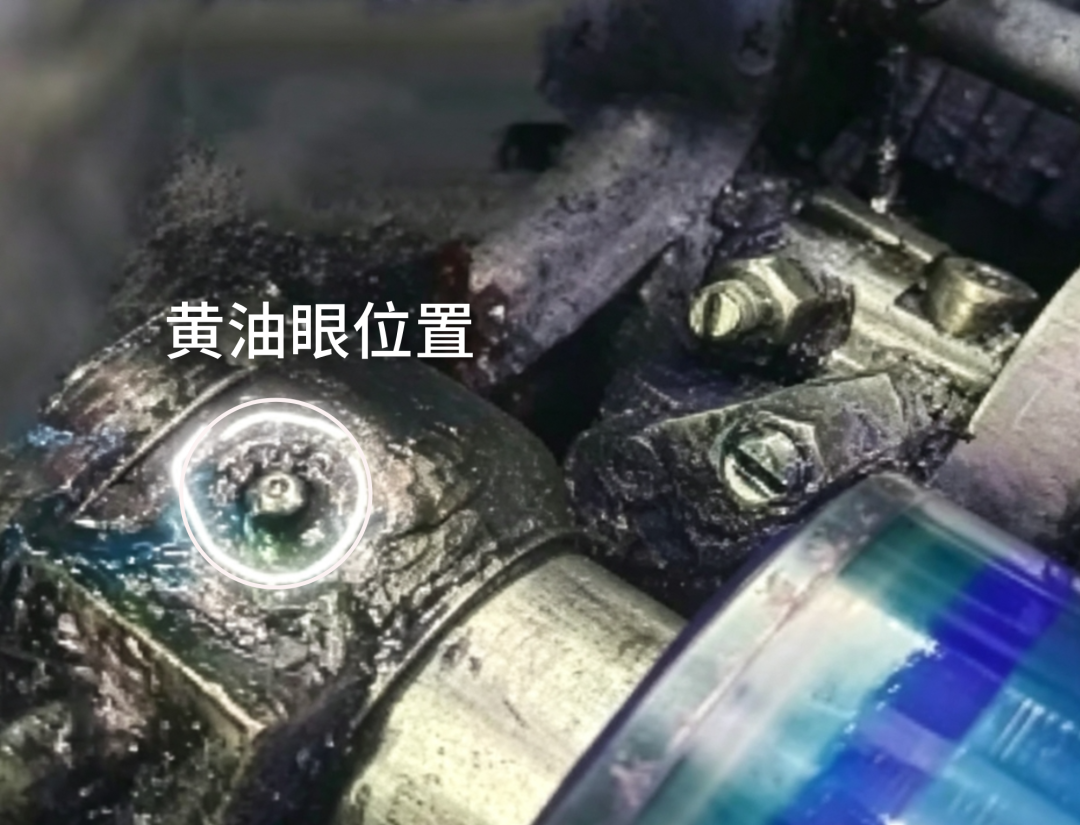 Figure 2: Near the outer butter eye
02/ Water volume variation
Ink-water balance is a key factor in the printing process; too much or too little water can affect ink color stability. Too much water can emulsify the ink, resulting in lighter and speckled ink colors; If the water level is too low, the printing plate surface will dry out, resulting in dirt and affecting ink color uniformity. This requires the machine manager to pay attention to several key points in controlling the dampening solution during printing:
(1) The pH of the dampening solution should be moderate; tap water should not be used directly; if possible, filtered purified water should be used. The pH value of the dampening solution should be controlled between 5.0~5.5. If the value deviates, the pH of the dampening solution will change.
(2) The prepared dampening solution should maintain a conductivity between 800~1200 μS/cm. If the conductivity is too high, it means there are too many impurities in the dampening solution, which will accelerate ink emulsification. The machine should regularly replace the water tank filter cotton. If the dampening fluid in the tank is too dirty, it should be replaced.
(3) Regularly clean up the accumulation in the sink. During printing, substances washed away by the plate water roller on the surface of the no-rinse plate will remain in the sink, especially when offset paper is heavily printed, as paper powder can also settle in the tank. Over time, a layer of mud-like deposits will form at the bottom of the sink, which is caused by the accumulation of various substances during printing. If not cleaned promptly, it will affect the concentration and pH of the dampening solution, causing unstable ink color.
03/ Paper characteristics
Different papers have varying ink absorption and surface characteristics, which also affect ink color. For example, when the paper is less smooth or the surface is rough, the ink's penetration increases, causing the ink to become lighter. You need to increase the ink amount and printing pressure to achieve a solid print; When the paper has poor ink absorption, ink buildup on the surface may make the ink appear too dark. Therefore, the machine captain needs to adjust the color according to the digital sample and reduce ink volume if necessary.
04/ Printing plate and rubber cloth issues
Wear on the printing plate, sand holes, or aging or deformation of the rubber cloth can also cause changes in ink color. Plate wear can make the depth of the graphic and text sections shallow, resulting in lighter ink tones; Expired printing plates can also have poor ink absorption for images and text, causing the ink to become lighter; Aging or deformation of the rubber cloth will affect the ink's delivery performance. For example, even if the blanket is not damaged, its surface gradually hardens due to prolonged use. It can be used for simple graphics and text, but with flat screens or fine work, the selective transfer ability decreases, leading to lower print quality, so it needs to be replaced with a new blanket.
Equipment adjustment methods
01/ Adjust ink supply
(1) Check the ink fountain and ink roller
First, check whether the ink in the ink hopper is sufficient. If the ink amount is insufficient, it should be replenished promptly. At the same time, check whether the ink bucket roller rotates normally to ensure its rotation speed matches the printing speed. Generally speaking, the rotation speed of the ink bucket roller should be adjusted according to the printing speed and ink volume requirements. If the ink is too light, the ink bucket roller speed can be appropriately increased; If the ink is too dark, the speed should be appropriately reduced.
(2) Clean the ink path
Perform regular maintenance on the equipment, thoroughly cleaning the ink path during each maintenance to ensure smooth ink transfer. If blockages or ink accumulation are found in the ink path, they should be cleaned promptly to avoid affecting the supply and uniformity of the ink.
02/ Adjust the water volume
(1) Check the water volume adjustment device
Check whether the water volume adjustment device is functioning properly to ensure the stability and uniformity of the water supply. Key checks: Check whether the surface of the water bucket roller has crystallized and hardened, whether the pressure between the water bucket roller and the metering roller is normal, and whether the pressure between the plate roller and the printing plate or water roller is normal. If the water volume is too high, the water supply can be appropriately reduced; If the water volume is too low, the water supply should be increased. The key point is to adjust the pressure of several rollers in the water path to normal, which makes printing much smoother.
(2) Adjust the concentration of the dampening solution
Adjust the concentration of the dampening solution appropriately according to the paper's water absorption and printing conditions. If the paper absorbs water well, the concentration of the dampening solution can be appropriately increased; If the paper has weak water absorption, the concentration should be appropriately reduced.
03/ Adjust the printing plate and rubber cloth
(1) Inspect the printing plate
Regularly check the wear of the printing plate. If severe wear or sand holes appear, or if the plate is expired, replace it promptly.
(2) Check the rubber pad
Check whether the surface of the rubber cloth is smooth and whether it is aging, deformed, or hardened. If the surface of the rubber pad is uneven or shows signs of aging, it should be replaced promptly.
04/ Adjust printing pressure
(1) Check Roller Pressure
Check whether the pressure between the impression roller, the plate roller, and the blanket roller is appropriate. If the pressure is too high, it may cause excessive ink transfer, making the color darker; if the pressure is too low, it may cause insufficient ink transfer, making the color lighter.
(2) Adjust Pressure
Adjust the roller pressure appropriately based on changes in the color. If the color is too dark, you can slightly reduce the pressure; if the color is too light, you can slightly increase the pressure. For example, if the paper surface is rough and doesn't absorb ink well, slightly increasing the pressure allows the ink to penetrate the rough grooves on the paper surface, making the color look darker to the naked eye.
Precautions During Adjustment
(1) Small Adjustments
When adjusting printing equipment, follow the principle of making small adjustments to avoid changing too much at once. After each adjustment, observe for a while to confirm how the color changes, then make further adjustments based on the actual situation.
(2) Consider Multiple Factors
Changes in color are usually the result of multiple factors. Therefore, when adjusting equipment, consider the ink supply, water amount, paper characteristics, condition of the plate and blanket, and other factors in combination, rather than adjusting just one thing.
(3) Record the Adjustment Process
Keep detailed records of each adjustment's parameters and the changes in color to summarize experience and provide reference for future printing work.
Color changes during printing are a complex issue. The press operator needs careful observation and analysis to find the root cause and take the appropriate equipment adjustments. By reasonably adjusting ink supply, water, plate and blanket conditions, and printing pressure, color issues can be effectively resolved, ensuring stable and consistent print quality. At the same time, during the adjustment process, the operator should focus on small adjustments, consider multiple factors, and keep good records to continuously optimize adjustment strategies and improve printing quality.