Say Goodbye to Color Inconsistencies! Unveiling ICC Profiles: Making Every Device Speak the Same 'Color Language'
Have you ever run into this kind of problem? The photos you carefully take look vivid on your monitor, but turn out dull when printed; the designs look perfect on screen, but the printed version is completely different? Usually, the culprit behind this is the devices not being able to 'speak the same color language.' Today, let's talk about the key to solving this industry headache-the ICC color profile, and how to create one efficiently.
1. Why do we need ICC color profiles?
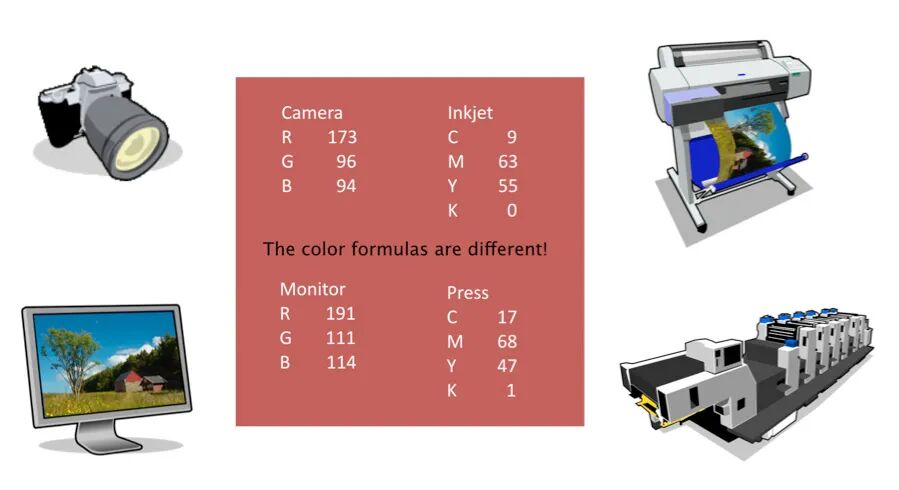
Imagine people from different countries need to communicate. Without a common language, the result is bound to be like talking without understanding each other. In the world of color, devices like cameras, monitors, scanners, printers, and projectors are like individuals speaking different 'dialects.' Each has its own unique 'color recipe' to display the same color. Even devices that both use RGB, like cameras and monitors, or those that use CMYK, like printers and presses, show colors quite differently.
An ICC color profile is a standardized 'color dictionary' and 'translation rule' developed by the International Color Consortium (ICC).
Its core function: to accurately describe the color characteristics of different devices (gamut, color behavior, etc.) and provide consistent color conversion rules throughout the workflow (from input to output), ensuring that colors are predictable, consistent, and repeatable when transferred between devices.
In simple terms, ICC profiles give all devices a unified 'color language,' allowing them to accurately understand and reproduce the colors passed between them.
2. Calibration and Profiling Are Both Essential
Just having a common 'language' isn't enough; each 'speaker' (device) needs to be accurate on its own. That's the point of device calibration.
Calibration: Adjusting devices (like monitors or printers) to a known, standard state. It's like making sure each 'speaker's' vocal organs (device hardware) are working at their best baseline.
Creating an ICC Profile (Profiling): Based on calibration, use professional tools to measure how the device actually displays colors and create an ICC file that describes its unique color characteristics. It's like writing a personalized 'color dictionary' and 'translation manual' for each calibrated 'speaker.'
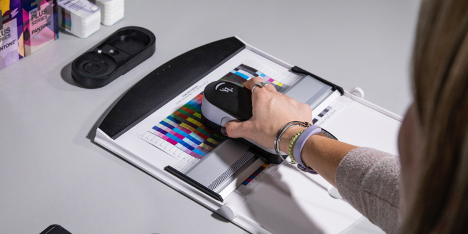
Only after calibration is completed and an accurate ICC profile is generated can the entire color management process truly achieve "what you see is what you get" (WYSIWYG). From capture, editing, and proofing to final output, the colors remain consistent throughout.
3. Powerful Tools for Efficiently Creating Accurate ICC Profiles
Once you know the "why" and "what," the next step is "how." X-Rite, as a leader in the field of color management, offers the flagship ICC profile creation solution-i1Profiler-which is the go-to tool for professionals.
What can i1Profiler do for you?
It creates high-quality ICC profiles for various input and output devices (cameras, scanners, monitors, projectors, printers, presses).
It supports a wide range of printing media (paper, film, special substrates, etc.) and printing processes:
1. Traditional printing & digital printing
2. RGB systems (such as inkjet, laser printing)
3. CMYK systems (standard four-color printing)
4. CMYK systems (multi-color printing with up to four spot colors)
With it, you can have full control over color performance on your devices, with complete confidence.
Key Hardware Partner: i1Pro 3 Series Spectrophotometers
The powerful functions of i1Profiler require precise hardware, which is where i1Pro 3 and i1Pro 3 Plus measurement devices come in:
i1Pro 3: Focused on standard materials in the printing and packaging fields, it can measure smaller color patches, meeting the needs for high-precision print profiling.
i1Pro 3 Plus: With a larger 8mm measurement aperture, it's more versatile. It can measure a wider range of material surfaces: beyond printed media to include industrial materials, signage, textiles, ceramics, and monitors/displays.
It offers optional polarization filters to effectively handle glossy, textured, or uniquely optical materials (like backlit textiles and films), and supports emission scanning (for monitors and signage materials).
Easy choice: mainly working in print and packaging? i1Pro 3 is sufficient. Need to handle more diverse and challenging materials? i1Pro 3 Plus is the more comprehensive choice.
Software Licensing and How to Get It:
i1Profiler software is licensed according to functionality, mainly divided into two levels.
i1Basic:

Core Function: Calibrate and create profiles for monitors and projectors.
Added Value: Verify the accuracy of proofing systems.
Target Users: Designers, prepress staff, photographers (mainly focusing on screen color accuracy and basic proofing verification).
i1Publish:
Includes all the features of i1Profiler.
Key Advantages: Powerful ability to create high-quality ICC profiles for CMYK printers and CMYK (up to 4 spot colors) multi-color printers.
Who It's For: Professional print shops, output centers, packaging printers, high-end imaging studios, and users who need precise color management for multi-color printing and complex outputs.
4. Accurate Color Starts Here
Achieving color consistency across devices is a key step in enhancing professionalism and customer satisfaction. From device calibration to generating precise ICC profiles, the X-Rite i1Profiler paired with the i1Pro 3 series hardware provides you with a complete, reliable, and efficient solution.