


Having trouble with color management? The secret to controlling the entire process is right here!
Advanced color management in the printing and packaging industry requires the realization of color consistency across equipment through systematic technical processes, and its core lies in the closed-loop control of three processes: color calibration, curve characterization and color space conversion. This article will systematically explain the key points of the whole process control of color management from multiple aspects.
The core points of color management
01/ The goal and significance of color management
The goal is to achieve "what you see is what you get", i.e. to ensure that the design end, the printing end, and the final product are highly color-consistent.
02/ Key links and technologies
The display must be calibrated according to the ISO 12646 standard to ensure accurate color display; Printing equipment needs to be calibrated regularly, such as ink density, dot gradation, printing pressure and other parameters to be accurately controlled; Commonly used color spaces such as RGB (design end), CMYK (printing end), and Lab (objective standard) are used to realize color conversion between devices through ICC feature files. Digital proofing can quickly verify color, while traditional proofing needs to consider the impact of paper characteristics, ink quality, and subsequent processes on color, and simulate the actual printing effect in advance. Use spectrophotometers, density meters and other instruments to measure color data, such as ΔE value should be controlled within the industry standard, that is, ΔE<2.5.
03/ Standardize processes and specifications
(1) Client standardization: Designers need to use calibrated displays, and the design files must contain spot color definitions, overprint information, etc., to ensure consistency with the printing data.
(2) Prepress document inspection: review file formats, fonts, color patterns, etc., and add auxiliary information such as color control strips and bleeding levels to provide accurate basis for printing.
(3) Proofing and mass production standards: new product proofing needs to determine the standard sample and upper and lower limit ranges; The first batch of mass production needs to strictly follow the proofing data to ensure the color consistency of the batch product.
04/ Challenges and solutions
(1) Material differences: For the color difference caused by different batches of paper and ink, it needs to be solved through strict incoming material inspection and color adjustment curves.
(2) Environmental factors: temperature, humidity, light source, etc. will affect the color presentation effect, and it needs to be produced in a constant temperature and humidity environment, and standard light sources are used for color evaluation.
(3) Technology and cost balance: Advanced color management requires investment in equipment, software and personnel training costs, but in the long run, it can improve efficiency and quality, and enterprises need to plan reasonably according to their own scale and needs.
System construction of color management
01/ Closed-loop equipment calibration
The use of spectrophotometer to realize the automatic calibration of the printing machine, reduce the paper waste of the traditional machine from 600~800 sheets to less than 50 sheets, and at the same time support the color stability control of new substrates and special inks.
02/ Feature files are dynamically updated
The color gamut of the device is recorded through the ICC characteristic file and updated monthly to cope with changes in paper and ink. Spot color management needs to be combined with Pantone color library and multi-color simulation technology, such as using 7-color ink groups instead of spot colors.
03/ Cross-batch consistency
The closed-loop system automatically adjusts the ink bond by scanning the ribbon in real time (2mm accuracy), and the tolerance range can be controlled at ΔE≤1.0 to meet the standards of brand customers.
04/ Multi-process matching
Digital proofing, flexographic printing, and offset color conversion require preset feature files, and platforms such as Yinya Cloud can automatically complete color gamut mapping, reducing manual drawing time by more than 70%.
05/ Standardize the implementation path
(1) Principle: calibration→ characterization→ conversion.
(2) Toolchain configuration: standard light source box, i1 Pro spectrophotometer, color management software
(3) Process control: Establish a pH value monitoring and color difference warning mechanism of the dampening solution to avoid color difference caused by environmental fluctuations.
Features of different color management software
01/ Core features of GMG
(1) High color accuracy: Using advanced color conversion algorithms, it can provide extremely high color reproduction, especially suitable for high-precision printing, such as trademarks, packaging, artworks and other fields.
(2) Strong applicability: It can be compatible with various types of printing machines, monitors, scanners and other equipment, providing color consistency guarantee for a variety of equipment.
(3) Professional color calibration function: Provide a variety of color calibration solutions, especially in the high-end market, GMG's color management capabilities can meet professional color matching needs, ensuring a high degree of consistency between equipment output and design.
Key benefits of GMG include:
(1) High-precision color conversion: ICC standard is adopted and color matching is carried out through precise algorithms, which is suitable for color conversion between various devices.
(2) Full color control: Provide complete color control solutions from design to printing to ensure color consistency in every link.
02/ Core features of CGS
(1) Cross-device color consistency: By calibrating monitors, printers and other equipment, creating color profiles can realize the color space conversion of images between different devices to ensure the consistency of the display effect of the film on different projection devices (such as digital cinemas and giant screen systems).
(2) Standardized workflow: Combined with hardware equipment, software tools and standardized processes, the whole process of color collection, editing, and output is controlled, which is suitable for printing, film and television production and other fields, which can reduce manual proofreading costs and improve production efficiency and color reproduction accuracy.
(3) Real-time color control: Support dynamic calibration of input and output devices, such as adjusting color parameters according to different paper and ink conditions to achieve the "what you see is what you get" copy effect.
Key benefits of CGS include:
(1) Software integration advantages: built-in remote proofing function, direct call of server resources through the Internet, and more localization of technology.
(2) Ease of operation: The color correction process is simpler, and the performance is more prominent in color reproduction, gradation duplication and reduction of dot enlargement.
(3) Market positioning: mainly for customers who purchase its software, and the applicable scenarios are more focused.
03/ Core Features of EFI:
(1) Comprehensive solutions: EFI provides a complete set of color management and production management solutions, suitable for different types of printing fields, such as commercial printing, digital printing, and packaging printing.
(2) Ease of operation: EFI's software interface is simple and clear, making it ideal for users who need to get started quickly, with a low threshold for operation.
(3) Integration of digitalization and automation: EFI is particularly suitable for digital printing and automated production lines, which can help enterprises improve efficiency and reduce human error.
Key benefits of EFI include:
(1) Flexible workflow: EFI provides a highly integrated workflow platform that supports automated equipment setup and color management, making it ideal for modern commercial printing enterprises.
(2) Support for multiple printing technologies: EFI not only supports traditional offset printing and flexo printing, but is also particularly suitable for digital printing.
(3) Cost-effectiveness: EFI's software solutions take into account cost-effectiveness and can provide more flexible pricing plans, suitable for printing companies of different sizes.
Color management for the client
Client implementation of color management is mainly based on the following reasons:
(1) Ensure color consistency: There are differences in color display and output between different devices (such as mobile phones, computers, printing presses).
(2) Maintain brand image: For brands, accurate color management can ensure that brand logos and promotional materials are consistent in different channels (such as websites, printed materials, advertisements), and enhance brand recognition and professionalism.
(3) Improve user experience: Correct color management can prevent users from visual fatigue or discomfort due to color distortion, especially when viewing pictures, videos, or designing and creating, providing a more realistic and comfortable visual experience.
(4) Adapt to the needs of wide color gamut: With the development of display technology and the popularization of wide color gamut screens, color management ensures that content is displayed correctly on wide color gamut devices, while being compatible with traditional color gamut devices to avoid color loss or oversaturation.
(5) Support professional creation and production: Professional users such as designers and photographers rely on color management to ensure accurate color transmission in different links (shooting, editing, output) and reduce rework costs caused by color deviations.
(6) Comply with industry standards and trends: In design, printing, packaging, film and television industries, color management is a necessary means to achieve standardized production and meet customers' requirements for color accuracy, which helps to improve production efficiency and reduce scrap rates.
The ISO 12646 international standard specifies the minimum requirements for color display characteristics during soft proofing, including uniformity, focusing performance, refresh rate, size, resolution, brightness, and viewing conditions. We refer to displays that meet this requirement as standard displays. Calibrate the display using the i1 Profiler color management software and the i1 Pro2 spectrophotometer to follow these steps:
(1) Set the display color temperature to D65 (to match the factory D65 light source) and set the Gamma value to 2.2.
(2) Measure and set the brightest and darkest values of the display.
(3) Measure the basic color rendering block of the display.
(4) Generate the ICC characteristic file of the display and store it.
Color management on the proofing end
01/ Color management for digital proofing
At the heart of digital proofing implementation color management is to address color reproduction differences between devices and ensure color consistency from design to output.
(1) Basic requirements for standard adaptability
(1) Color matching requirements: ISO 12647-7, as a digital proofing standard, requires the printer color gamut to cover the CMYK color gamut range of traditional printing (such as ISO 12647-2), and needs to achieve color gamut mapping and color gamut matching through ICC feature files.
(2) Gray balance control: The G7 calibration method is used to ensure that the L*a*b* value deviation of the neutral gray region is ΔE≤1.5, and the gradation consistency is achieved by adjusting the TVI (dot enlargement curve).
(2) Key management processes
(1) Equipment linearization calibration: use a spectrophotometer to measure the field density and network increase value of the printing machine; The ink volume curve is adjusted by DFE digital front-end to make the gradation error of 1%~99% dots ≤±2%.
(2) Feature file generation: Based on the three matching methods of ISO/TS 10128, the ICC feature file that complies with the Fogra or GRACoL standard is generated, and the CMYK to CMYK 4D spatial conversion is supported.
(3) Special scene processing: When using non-standard paper, such as gray paper, it is necessary to correct the color difference in real time through the closed-loop calibration system to ensure that the film is still in line with the standard after lamination and oiling.
(4) Cross-device consistency: The RGB direct connection technology of digital proofing manufacturers can simplify color matching, but it is still necessary to calibrate the printhead, ink and environmental parameters regularly, and mandatory calibration is required when the temperature and humidity change exceeds ±5%.
(5) Verification and iteration: Use the IT8 color target specified by ISO 12647-7 for color aberration scoring, requiring ΔE≤2.0 (commercial grade) or ΔE≤1.5 (high-end applications), and continuously optimize through cyclic correction.
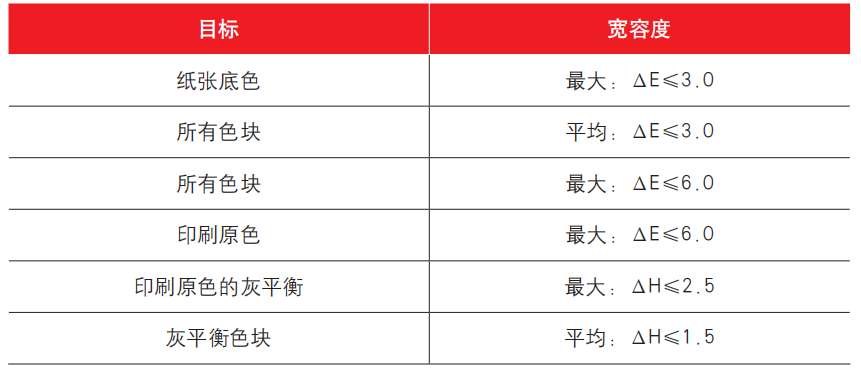
According to the ISO 12647-7:2007 standard, the control strip measurement data on digital proofing paper and digital proofs should fall within the ranges specified in Table 1 and Table 2.
Table 1 Requirements for Digital Proofing Paper
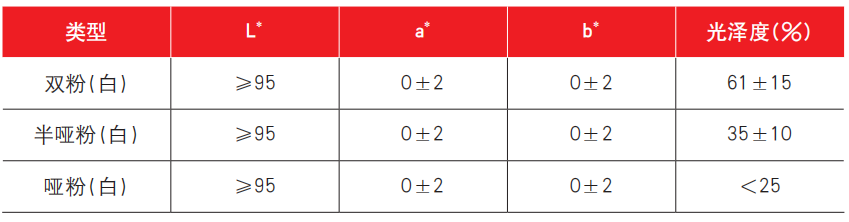
Table 2 Digital Proof Color Standards
02/ Color Management in Traditional Proofing
Standardization of printing files is crucial in the proofing process. The usual sequence is to first standardize individual files, then standardize imposition files, followed by standardization of color control bars, registration marks, and process information. Figure 1 shows a related example.