


Fu Qiang Column | How to Choose Printing Inks for Film Adhesive Materials? What Should Be Noted in Printing? Remember These Key Points!
Film adhesive materials are a type of polymer whose surface does not absorb printing ink. The drying methods for printing ink on the surface of film adhesive materials include evaporation, coalescence, cross-linking, and curing, with almost no penetration, which is quite different from paper-based adhesive materials. The surface energy of film adhesive materials is low, and pretreatment is required before printing to meet the wetting and leveling requirements of the ink; otherwise, problems such as poor ink adhesion may occur.Selection and Application of Printing Ink01Use inks, varnishes, and additives specifically designed for film printingThere are many types of inks, and some are specifically designed for film adhesive materials, or even for a particular type of film adhesive material. Therefore, the ink must be specifically used along with compatible varnishes and additives; otherwise, mismatches between the ink and the substrate can lead to printing quality issues and cause the ink layer to peel off.02Use inks that match the coating of the film material to increase ink layer adhesionFor coated film materials, inks with compatible performance must be chosen; otherwise, ink may peel off. If the ink is properly chosen, the resins in the ink will bond firmly with the resins in the coating, and even if the ink has not fully dried, the ink layer will not peel off. For example, a label printing company found poor results when using Hanghua 161 ink for a certain product, but after switching to VP ink of the same brand, the results improved and the ink peeling problem was resolved.
03
Control the ink layer thickness, and if necessary, use the overprinting method.Some printed materials require a certain thickness of the ink layer. When the ink layer is thick, incomplete drying of the ink can cause ink shedding. The best solution is to use screen printing and gravure printing. For printing factories without these conditions, using the same-color ink for double printing can be considered. The usual practice is to first print a very thin layer of ink, and after it is completely dry, print again on the surface. After the two printings, it not only improves the ink layer thickness but also addresses the ink adhesion issue, meeting the process requirements.04Control the ink drying speedPay attention to the ink's shelf life. When the ink dries slowly, a small amount of drier can be added to increase the drying speed.05Ensure the ink drying or curing energyRegular cleaning of the ink curing device and periodic replacement of UV lamps are key to ensuring complete UV ink curing. Regularly check the efficiency and status of the UV curing device using instruments or test paper, and adjust the ink layer thickness and printing speed based on this data to achieve the best printing results.06Control the printing speed for multicolor printing and ensure the ink layer is thoroughly dryFor multicolor printed labels, high-speed printing is not recommended. It is suggested to control the printing speed at 30–50 m/min to ensure the ink layer is completely dry and reduce waste.Elimination of static electricityStatic electricity is one of the main factors causing quality problems during the printing of film sticker materials. Eliminating static electricity or controlling it within a certain range is necessary in the printing of film sticker materials. Static elimination requires consideration in two aspects for printing companies: environmental requirements and the addition of corresponding static elimination equipment.01Temperature and humidity controlLow temperature and dryness are the main causes of static electricity. When the printing workshop is around 22℃ and the relative humidity exceeds 50%, the static on the surface of the film sticker material disappears or is minimized. Therefore, the production workshop must control temperature and humidity. Install a constant temperature and humidity device in the workshop. For companies without such conditions, consider isolating printing equipment, such as building a small glass room to create an ideal printing environment within a small environment. Currently, some small and medium-sized label printing companies in northern China commonly use this method to control static electricity with good results.02Install static eliminating devicesCommon static eliminating devices come in two types. One is electric, which generates a large amount of ions in its electric field to absorb, neutralize, and eliminate free electrons on the film surface, thus eliminating static electricity. The other is discharge type, which can operate without any energy, as shown in Figure 1. When the film passes through a metal wire (also called a static eliminating cord), excess electrons on the film surface disappear through the metal wire into the ground. Because the potential of the metal wire is lower than the potential of the free electrons on the film surface, the film achieves static elimination after passing the metal wire discharge.
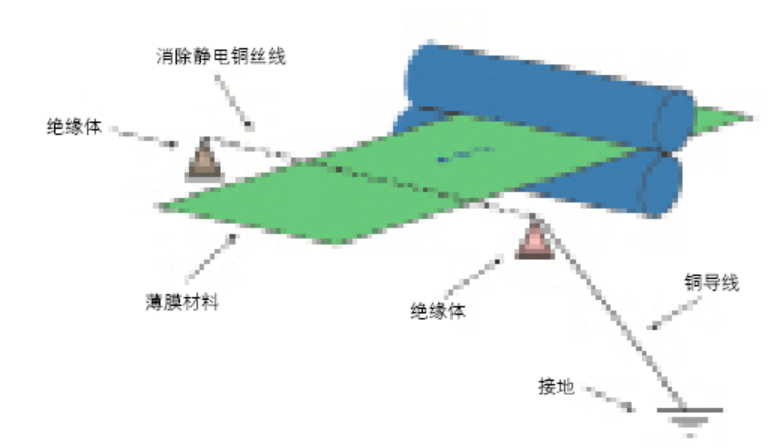
Figure 1 Schematic diagram of a discharge-type static eliminatorStatic eliminators are very practical devices used in the printing process of thin film self-adhesive materials. They can be placed at multiple positions on printing equipment as required. As shown in Figure 2, static eliminators are installed before and after the die-cutting station. When installing static eliminators on a printing press, the following issues should be noted: The equipment must be grounded, as grounding allows static electricity to be conducted into the earth; the static eliminator must also be grounded, and it should be grounded separately to ensure effective static elimination; Static electricity is generated continuously, so if possible, static eliminators should be installed at all stations of the printing press, including the paper feeding station, various printing processing stations, and the paper receiving station, for the best effect; The effectiveness of static elimination should be checked regularly to ensure the reliability of the static eliminator.
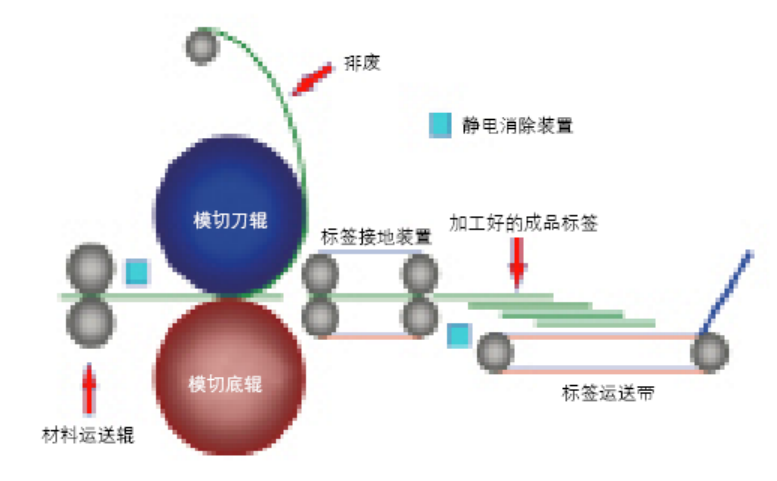 Figure 2 Die-cutting and waste disposal units with electrostatic treatment devices installedPrecautions for Printing on Film Adhesive Materials01Properly Control Printing TensionFor intermittent and reciprocating paper-feeding printing equipment, it is easy to control the paper-feeding tension. Examples include Japan Lindetec's B-100 label printing machine and the 300-type cylinder-to-cylinder label printing machine. These types of equipment are constant-tension printing machines with stable tension, which does not affect print registration. However, for continuous paper-feeding rotary label printing machines, such as flexo machines and satellite label printing machines, it is necessary to strictly control and adjust the printing tension, otherwise misregistration may occur.Tension control on the printing machine includes controlling both the paper-feeding tension and the rewinding tension. These must be adjusted according to different types and widths of materials to ensure normal printing.(1) Paper-Feeding Tension ControlProper paper-feeding tension ensures accurate registration of film adhesive materials and prevents material deformation during printing, meaning the material edges do not tilt. If the edges of the material rise during printing, it indicates that the rewinding tension is too loose or the taper is set improperly. The material needs to be rewound and reprinted. If rewinding equipment is not available, a temporary solution is to install a clamp on the unwinding shaft to prevent the material edges from rising. However, registration issues may still occur in this case.(2) Rewinding Tension ControlRewinding tension is also related to printing registration and determines the neatness of the rewound edges. If the rewinding tension is too low, it affects registration and causes uneven edges, creating difficulties in subsequent processes. If the rewinding tension is too high, problems such as adhesive seepage on the material edges, label displacement, or liner breakage may occur after printing, affecting printing efficiency. Therefore, proper rewinding tension is crucial, and generally, the optimum tension value must be determined through testing.For continuous paper-feeding label machines, it is essential to control both paper-feeding and rewinding tension. After achieving qualified printing for different types and widths of materials, it is important to summarize and record these data to improve efficiency and ensure quality. Typically, rewinding tension should be equal to or greater than unwinding tension, but not exceeding double the unwinding tension.02Use Varnishing Instead of LaminationEach film material has its unique physical and chemical properties, and some are not suitable for lamination. Laminating after printing can destroy the material's properties. PE materials have a soft surface and can be applied to curved or spherical surfaces. Commonly used laminating materials are rigid BOPP films. Once laminated labels combine PE and BOPP, their properties change, rendering them unsuitable for application on curved or spherical objects.During the combination of the two materials, tension mismatch issues may also occur, causing label deformation and leading to problems such as lifting or detachment in application. Therefore, for large-area labels and labels applied to curved surfaces, it is recommended to use UV varnishing instead of lamination. Varnishing not only protects the ink layer but also optimizes the material's characteristics for the best application performance.
03
It is recommended to use 150 lpi for printing color halftone labels, and 175 lpi is not recommended.
Labels ultimately attract consumers' attention through shelf appeal. For printed materials, the higher the line screen, the clearer the images and text, but the less ink is used, resulting in lighter colors; the lower the line screen, the more ink is used, creating a stronger visual effect, but the images and text appear rougher.
The line screen number is also directly related to printing quality, print waste rate, the precision of printing equipment, and printing materials. A higher line screen requires smoother materials and more precise equipment; otherwise, quality standards cannot be met. A lower line screen allows for more lenient conditions. Therefore, the best choice for film labels is a 150 lpi color halftone, which satisfies visual effects and shelf appeal, ensures printing quality, keeps consumption within a reasonable range, and achieves a balanced overall result.