


Printing ink imbalance, scrap rate soaring
When our company uses the Heidelberg CD102 press for four-color printing, we found significant abnormalities in the 50% and 75% halftone dots of the magenta plate in the main text area (Figure 1). The main manifestations are enlarged and unevenly distributed dots, blurred images and text, noticeable color changes during printing, and a significant increase in water consumption by the machine. These issues result in obvious color fading of the prints, reduced saturation, loss of midtone gradation, and a noticeable increase in the defect rate.
Cause of the Fault
The staff first checked the impression blanket cylinder and feeder gripper, confirming that lubrication was normal and that the blanket and gripper were clean and free of impurities. However, when checking the pressure of the inking rollers against the plate, they found unstable pressure. After systematic troubleshooting, the root cause of the fault was identified as follows: the bearing of the 80mm diameter plate roller on the operating side seized due to lack of lubrication. During machine operation, the bearing housing rotated synchronously with the plate roller, causing severe wear on the bearing cup (Figure 2). The amount of wear far exceeded the standard range, causing deep wear on the bearing seat fitting surface.
When the machine is running idle, the 80mm diameter plate roller can move relatively smoothly within the bearing cup; however, during impression production, the plate roller first contacts the inking roller unidirectionally, and after impression, it contacts both the inking roller and the plate. Each time the machine rotates one cycle, the instant the plate roller touches the plate, irregular shaking occurs inside the worn bearing cup. This phenomenon first damages the printing dot, causing the blurred and distorted dots shown in Figure 1. In addition, the shaking of the plate roller when in contact with the plate also causes irregular changes in the pressure between it and the inking roller and between it and the plate, which can easily lead to ink streaks and water-ink imbalance during printing of flat tints.

Figure 1 Problematic print (left) and adjusted print (right)
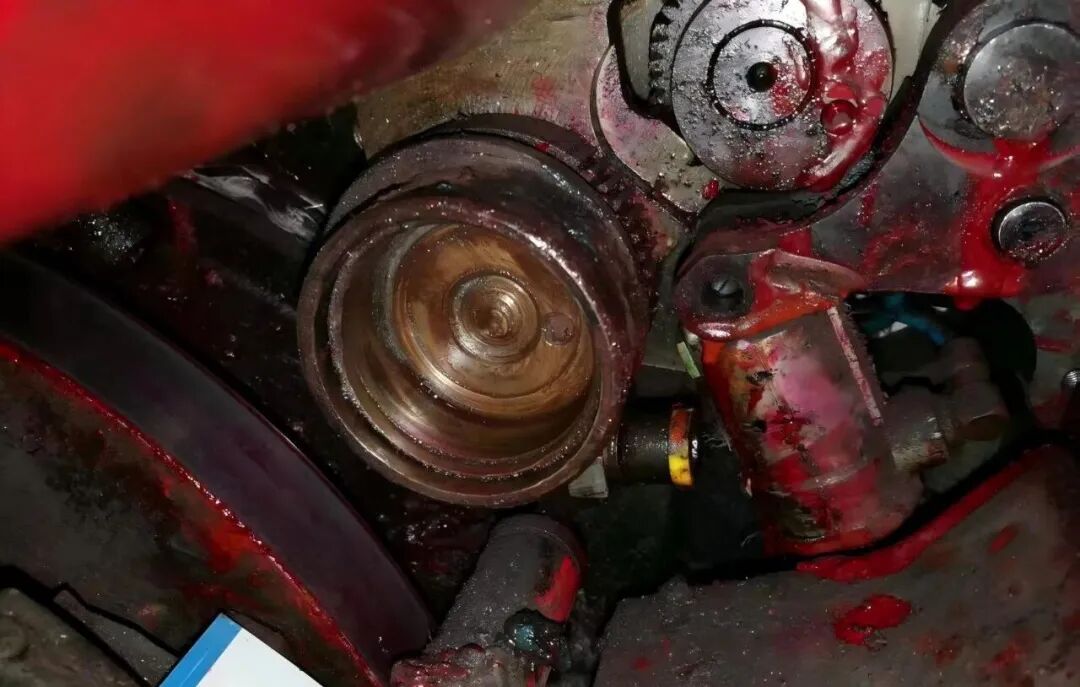 Figure 2 Shaft Bowl Wear Condition
Standardized Maintenance Procedure
Since the form roller mainly relies on the distribution roller for movement and only makes a regular slight deceleration when in contact with the printing plate, it is important to strictly follow the standard in Figure 3 when adjusting printing pressure. The pressure ratio between the form roller and the distribution roller should be 1mm greater than the pressure on the printing plate. If the pressure between the form roller and the printing plate is greater than that between it and the inking roller, the form roller will decelerate irregularly, causing uneven ink transfer, resulting in excessive water and ink, and ultimately leading to unstable ink color.
In actual production, when staff check the pressure of the form roller, they usually only focus on the pressure between the form roller and the printing plate, neglecting the pressure with the inking roller. The following is the standardized maintenance procedure.
(1) Shutdown and Cleaning: Cut off the power and lock the device with a tag, use a dedicated cleaning agent to thoroughly remove ink film from the roller surface and metal debris inside the bearing housing.
(2) Component Replacement: Replace the original factory bearing components (including bearing bowl/balls/cage). Before installation, they must undergo ultrasonic cleaning and nitrogen purging to ensure zero-contamination installation.
(3) Pressure Calibration: Use Heidelberg pressure test film for calibration (as shown in Figure 3).
(4) Specify Pressure Standards: The ink line width between the form roller and distribution roller should be 4±1mm; the contact width with the printing plate is set at 4-1mm.
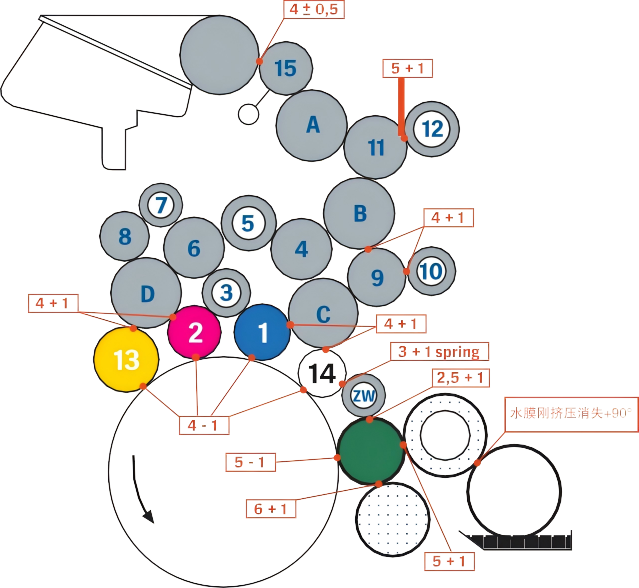
Figure 3 Printing Pressure Adjustment Standard
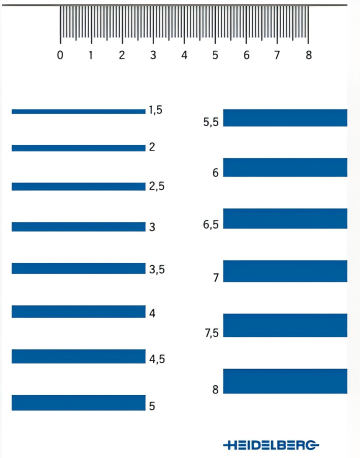
Figure 4 Heidelberg stress test film
Maintenance effect
After standardized maintenance, the quality of equipment and printed products has been significantly improved, and all indicators have returned to the normal range:
(1) The 50% outlet increase value of the magenta version fluctuates back and forth from 22%~45% before maintenance to about 18% (in line with the requirements of 17±3% outlet increase).
(2) The gradient smoothness of the gradient level of 75% dot density is increased by 40%, and there is no obvious discoloration during the printing process.
(3) The data monitoring of continuous production for 8 hours shows that the printing water consumption (after the repair of the faulty unit) is reduced by 20%, and the scrap rate is reduced from 22% to 0.2%.
(4) The equipment stability monitoring found that during 72 hours of continuous operation, the infrared thermal imager showed that the temperature of the plate roller bearing was stable in the normal range of 40±2°C, and there was no abnormal peak in the vibration spectrum analysis.
Problem analysis
01/ Defects in maintenance mechanisms
One of the core causes of this failure is that there are obvious defects in the equipment maintenance mechanism, and the relevant operations violate the requirements of the equipment maintenance manual, which stipulates that the ink roller needs to be disassembled every month, the bearing condition should be checked, lubricating oil added and the ink roller pressure should be adjusted in a standardized manner. In addition, during the previous maintenance, ordinary feeler gauges were mistakenly used instead of Heidelberg's special ink trace width detection film, resulting in a gap setting deviation of 2.2mm, and the pressure of the ink roller was mistakenly set to 6.2mm (55% exceeding the standard value), resulting in bearing overload.
When the normal indentation of the rubber roller is 4mm, the pressure is 18N; When the indentation reaches 6mm, the pressure increases to 63.5N, and when the indentation reaches 8mm, the pressure is as high as 149N. The larger the indentation, the faster the wear of the equipment, the higher the consumption of ink and dampening fluid, and the corresponding increase in electricity consumption. At the same time, excessive pressure will lead to obvious heat accumulation of the rubber roller, higher temperature and wide indentation, which will increase the actual pressure in the printing process nonlinearly, accelerating the hardening of the rubber roller. Although the hardness of the rubber roller can enhance the corrosion resistance to a certain extent, it will significantly reduce the water and ink transfer capacity, increase the ink loss of the printing equipment and the wear of the printing plate graphics. Therefore, without affecting the printing quality, the pressure of the rubber roller should be reduced as much as possible, and the minimum value specified by the manufacturer should be kept as optimal.
02/ Do a good job of rubber roller maintenance
The daily maintenance of rubber rollers needs to form a standardized process, and the pressure of the plate needs to be checked during the daily handover; During weekly maintenance, it is necessary to focus on checking the pressure of the plate roller and the ink roller, and do a good job in the maintenance of the plate ink roller to ensure that it is always maintained in a relatively stable state during production.
The surface of the new rubber roller should be uneven, and it feels a little astringent to the touch (Figure 5), so as to ensure the uniform transfer of water film and ink. In the process of long-term use, due to the constant contact with ink, dampening fluid and various solvents every day, coupled with the influence of the external environment, the hardness of the new rubber roller will usually increase after a period of use, which is a normal state. If the shrinkage and hardening of the rubber roller are light, the ink transfer characteristics can be maintained by adjusting the pressure appropriately.
The increase of the hardness of the rubber roller also means that the paper wool paper powder and the oxidized substances in the dampening solution have been deposited on the surface of the roller, forming a hardened film. This hardened film must be removed periodically (Figure 5) to prevent it from continuing to harden and glaze, which can cause instability in ink transfer and water transfer. When the surface hardens, the dirty glazing substance should be removed with calcium removal paste during maintenance.
The choice of cleaning agent is the most critical factor in determining the life of the rubber roller. Although highly volatile detergents are easy to remove hardened sediments on the surface, they will also cause the shrinkage of the rubber rollers. Improper use of cleaning agents will also lead to the expansion, contraction and deformation of the rubber rollers, affect the stability of the pressure between the rubber rollers, and even corrode the pipelines, sealing rings, machine paint and even rubber blankets. Therefore, semi-water-based, low-VOCs car wash water should be chosen. After maintenance, the rubber roller needs to be restored to the feel of the new rubber roller to be considered in place. There are no shortcuts to maintenance, and it must be persistent.
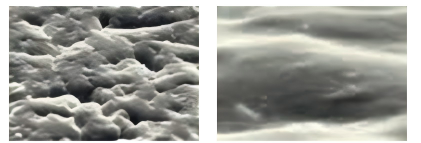
Figure 5 Surface of a new rubber roller (left) and surface of a glazed rubber roller (right)
The key to the quality of printed products lies in the balance between water and ink, and the plate water roller and ink roller play a crucial role in maintaining this balance. In daily production, various quality problems caused by improper adjustment or wear of the rubber roller are common. Therefore, it is essential to regularly inspect and test the rubber rollers, and to perform regular maintenance and adjustment of the roller surface, diameter, and pressure to ensure that each roller is in an appropriate condition. When adjusting the equipment, the process should be data-driven and standardized, contributing to the high-quality development of the industry.