


Frequent problems with inkjet white lines and misregistration on cigarette packs? Here's a complete guide to fixing them
The cigarette pack printing industry is going through a shift from traditional printing to digital printing and smart technology. Today, to meet consumers' growing brand awareness and anti-counterfeiting needs, high-end printing techniques like UV printing, hot stamping, and embossing are used to enhance the texture and visual appeal of cigarette packs. At the same time, with the development of innovative printing processes for cigarette packs, by the end of 2022, the State Tobacco Monopoly Administration decided to add QR codes to all branded cigarette packs, making each pack uniquely identifiable. This provides anti-counterfeiting and traceability features for cigarette products, protecting consumer rights and combating counterfeit products.
Changsha Jingkai Printing Technology Co., Ltd. took the lead in upgrading Heidelberg CD102 offset presses with QR code inkjet units, achieving integration of Heidelberg offset UV printing and QR code inkjet printing. This article focuses on the numerous inkjet printing issues that emerged over more than three years of operating this high-speed Heidelberg press-linked inkjet equipment. It analyzes and summarizes solutions to the most prominent problems, such as QR code registration accuracy and white line issues in QR codes (as shown in Figure 1), to provide a reference for everyone.
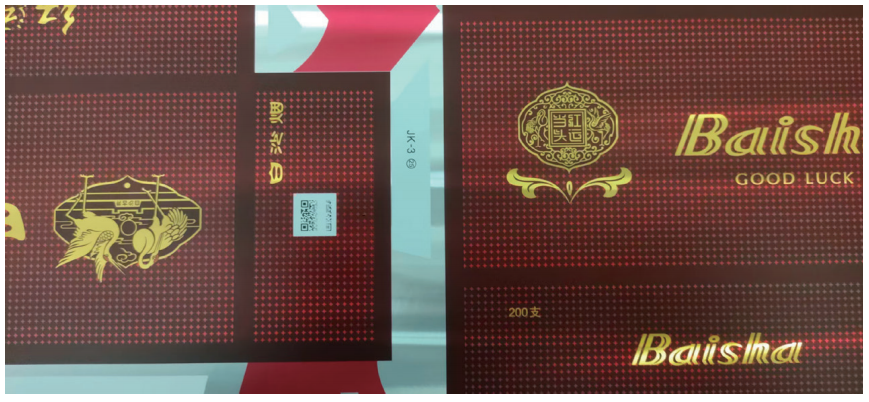 Figure 1: White Line Issue on Cigarette Pack QR Codes
Working Principle of UV Inkjet Printers
UV inkjet printers use UV light (ultraviolet) to irradiate a certain area at a certain frequency, combined with UV ink, to quickly cure printed products. UV ink is fast-drying, has good adhesion, and does not clog the nozzles.
UV inkjet printers are high-resolution printers with a printing accuracy of 200 dpi. Hundreds or more piezoelectric crystals control multiple nozzles on the nozzle plate. The CPU processes the signals and, through the driver board, sends a series of electrical signals to each piezoelectric crystal. The crystals deform, causing a sudden volume change in the liquid storage structure, which ejects ink droplets from the nozzles onto the moving product surface, forming dot patterns that create text, numbers, or graphics. After ink ejection, the piezoelectric crystals return to their original state, and new ink flows into the nozzle due to the surface tension of the ink. With high ink dot density per square centimeter, UV inkjet printers can print high-quality text, complex logos, barcodes, and QR codes.
Causes and Solutions for Inkjet White Lines
01/ Causes of the Inkjet White Line Problem
(1) UV Ink Printhead Clogging
There are many reasons for printhead clogging; common causes include:
① Ink Sedimentation: If the printhead used for cigarette pack printing is not used for a long time, or if the ink in the printhead evaporates or deteriorates, many chemical components in the ink can precipitate, causing clogging.
② Solvent Evaporation in UV Ink: Due to the compactness of the Heidelberg CD102 printing press, during modifications to the printing units, the high environmental temperature can cause UV ink solvent to evaporate, leading to printhead clogging.
③ Contamination of UV Ink: The UV ink tank is located at the bottom of the equipment, and there is a powder spraying device above it. Dust and moisture can easily enter the UV ink, causing nozzle blockage.
(2) UV Ink Supply System Malfunction
The ink path of the UV ink print process is shown in Figure 2. There can also be some issues in the ink supply system.
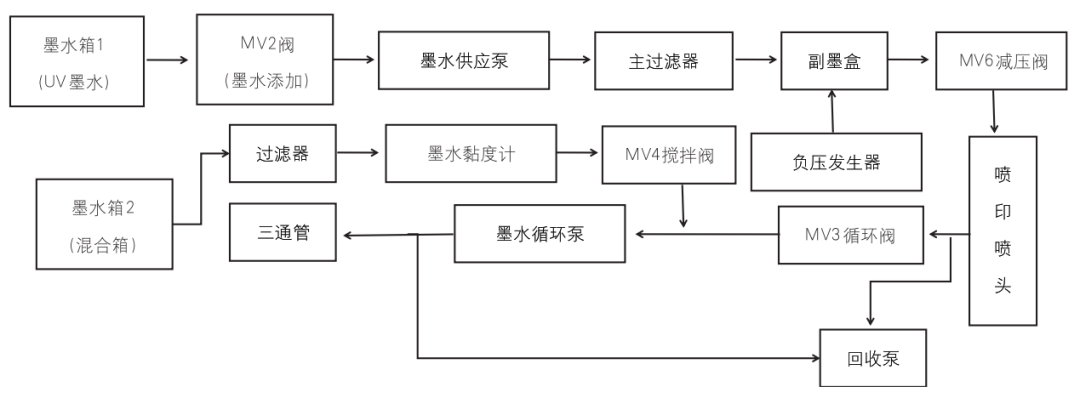 Figure 2 Ink Printing Flowchart
① Ink supply pump failure: The ink line pressure is provided by the ink supply pump. If the ink supply pump fails, the overall ink line pressure drops, leading to insufficient ink supply to the printhead.
② Filter clogging: The main ink line filter acts as the 'gatekeeper' of the entire ink system. If the filter is clogged, it's like adding a 'half-closed valve' in the middle of the ink line, causing a pressure drop and resulting in low ink supply.
③ Pressure relief valve MV6 failure between the secondary ink cartridge and the printhead: If MV6 fails, after the printing system is activated, MV6 won't supply ink, causing the printhead to run dry.
(3) Secondary ink cartridge negative pressure system faults
① Negative pressure generator failure: The whole negative pressure system is powered by the negative pressure generator. When it fails, the negative pressure inside the secondary ink cartridge is insufficient, causing the printhead to 'fail to hold' ink. Ink droplets may appear at the bottom of the printhead, and these droplets can block the ink coming down during printing.
② Loose pipes or connectors in the negative pressure system or ink supply tube: While the printhead is collecting ink, the entire ink system is under negative pressure. If a negative pressure pipe or ink supply tube is loose, air can enter, reducing the negative pressure and causing poor ink collection.
③ Failure of the secondary ink cartridge sealed chamber system: The secondary ink cartridge is a sealed negative pressure chamber. If the rubber seal inside the cartridge is deteriorated or softened by ink, the sealed system will be compromised.
(4) Inaccurate print process parameter settings
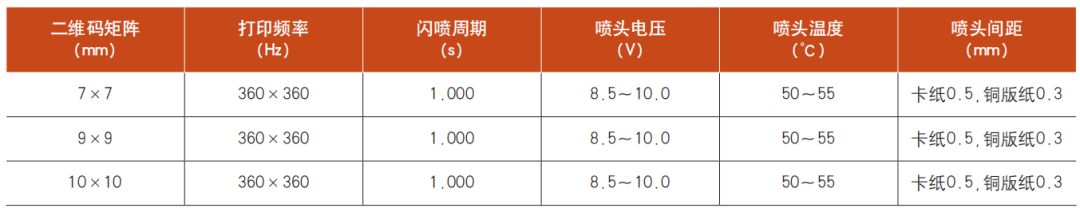
Table 1 shows the standardized print process parameter settings. If the UV ink parameters are not well matched, it may cause QR codes to appear blurry or white lines to appear.
Table 1 Standardized Print Process Parameters
02/ Solutions for Inkjet White Lines
(1) Solutions for UV Inkjet Print Head Clogs
① Ink Sediment Dilution and Cleaning: For sediment formed from chemical reactions in the ink, use a cleaning agent in the circulation pump to dilute and clean.
② Prevent Solvent Evaporation in UV Ink: Maintain equipment environment at 26°C and humidity at 65%.
③ Prevent Other Impurities from Mixing in UV Ink: Keep UV ink in a sealed storage box.
(2) Troubleshooting UV Ink Supply System
① Ink Supply Pump Troubleshooting: Use SMC sy25-10 (24V, 3W) ink supply pump, which provides stable ink flow and appropriate dust control parameters.
② Replace Filters in Time: Main ink line filter generally needs replacement every 3 months.
③ Replace the pressure-reducing valve MV6 between the auxiliary ink cartridge and the print head.
(3) Troubleshooting Auxiliary Ink Cartridge Negative Pressure System
① Negative Pressure Generator Troubleshooting: The entire system's pressure is provided by the negative pressure generator. Pipes use pressure sensors to detect negative pressure and feedback to the PLC panel with an alarm function.
② Signal Collection for Auxiliary Ink Cartridge Closed-Chamber Negative Pressure System: The auxiliary cartridge is a sealed negative pressure environment. If the sealed chamber is broken, the comparator at the outlet compares values with the input pressure. Deviations cause the comparator to output 0–10V, which the PLC uses to determine if the system balance is disrupted.
(4) Adjustment of Print Process Parameters
Modify print frequency, flashing cycle, print head voltage, print head temperature, and head spacing according to standardized process parameters in Table 1. Prioritize correcting print head voltage and spacing.
Causes and Solutions for Inkjet Registration Accuracy Issues
01/ Causes of Inkjet Misregistration
(1) Printing Equipment: Our Heidelberg CD102 offset press is over 17 years old, which causes reduced precision and inaccurate print positioning. Worn structures like feeders, impression cylinders, and gripper mechanisms affect paper transfer stability.
(2) Print Material Factors: Material defects like warped paper, uneven thickness, inconsistent absorbency, or static can shift printed code positions.
(3) Operator Factors: Low skill levels in operators can lead to inaccurate adjustments. Not following standard operating procedures, such as calibrating print codes, checking parameters, or correcting print process settings, can cause errors.
(4) Printing Environment: Temperature, humidity, or vibration between machines can impact equipment stability, paper deformation, and ink drying.
02/ Solutions for Inkjet Misregistration
(1) Printing Equipment Precision Restoration: Regularly inspect and replace parts on the Heidelberg CD102, such as feeder cams, impression cylinder balls, and gripper mechanisms, to restore print precision and improve stability.
(2) Optimize Print Material Selection: Improve lamination process for even paper thickness, avoid poor-quality or warped paper, adjust UV ink formula, calibrate UV lamp power, and control storage temperature and humidity of cut prints.
(3) Enhance Operator Skills Training: Provide specialized training to ensure operators can skillfully adjust equipment and troubleshoot. Establish and strictly follow pre-print standard procedures.