


Frequent black and white lines in cigarette bag printing-4 key methods to easily solve it!
At the end of 2022, the National Tobacco Monopoly Administration issued regulations requiring all cigarette packaging to be printed with QR codes to achieve full-process traceability and anti-counterfeiting control. This policy imposes stricter requirements on the quality of inkjet printing for cigarette pack printing companies: the symbol quality requirements for QR codes must comply with the national standard GB/T 33993-2017 "Commodity QR Codes" ≥1.5/XX/660 (where 1.5 is the reference number for measuring aperture size, and the selection varies depending on the application environment; 660 is the measured light wavelength, unit: nm, with an allowable deviation ±10nm), to ensure that QR codes can be stably and accurately read on high-speed cigarette pack lines.
However, in the early stages of policy implementation, many cigarette pack printing companies encountered severe quality bottlenecks. High-speed sheet-fed inkjet printers, as mainstream QR code assignment equipment in the cigarette packaging industry, frequently exhibit quality defects such as black lines, white lines, and plate paste during actual production, resulting in a high decoding failure rate and seriously affecting production efficiency and product delivery timeliness.
This article is based on the technical research practices of a large cigarette pack printing enterprise. In the early stages of production, when using high-speed sheet-fed inkjet printers, issues such as white lines and paste were particularly prominent. Almost every plate paper production process frequently stopped due to quality defects, with an effective production time per shift less than 50%, and a defect rate far exceeding industry acceptable levels.
Through continuous tracking and data collection, the technical team focuses on two of the most representative defects-white lines, black lines, and the resulting dirty paste issues. This article systematically summarizes the causes, handling measures, and long-term control mechanisms of these issues, aiming to provide reference for peers.
High-speed inkjet printers face issues with white lines, black lines, and pasted plates
Cause analysis
In-depth analysis of the causes of quality issues is a prerequisite for formulating effective countermeasures. Quality defects in cigarette bag QR code printing are usually not caused by a single factor, but are the result of the coupling of multiple factors such as print head status, ink performance, equipment parameters, and environmental conditions.
01/ White Line Problem
(1) Phenomena and Effects
White lines refer to white lines running through or partially vertically appearing in QR code patterns, caused by specific nozzles failing to properly eject ink droplets, resulting in missing image information. In mild cases, it only affects aesthetics; in severe cases, module loss directly leads to decoding failure and results in the product being deemed defective.
(2) Key cause analysis
(1) Physical blockage of the printhead: This is the most common cause of white line issues. The nozzle pore is extremely small, and after prolonged use, solvent evaporation easily forms a dry conjunctival film on the nozzle surface. Tiny pigment particles and environmental dust can enter the nozzle, causing localized blockage. The blocked nozzle cannot eject ink droplets, resulting in continuous or intermittent white lines along the paper flow direction.
(2) Abnormal ink supply system: Bubbles mixed into the ink supply line are a hidden but common cause. Bubbles in the ink circuit are compressible; when pressure waves are transmitted to the nozzle, the bubbles absorb energy, causing ink droplets to fail to be ejected normally, manifesting as random white lines. Additionally, if the filter is not replaced for a long time, more impurities are retained, causing the ink supply pressure to decay and also triggering the white line problem.
(3) Ink rheological mismatch: Ink viscosity and surface tension are key factors affecting droplet fracture behavior. When viscosity is too high, filamentous fractures at the nozzle are not brittle, and the ink tends to accumulate at the nozzle mouth, hindering subsequent droplet ejection; Abnormal surface tension causes unstable meniscus morphology, disrupting the continuity of ink droplet ejection, thus forming white lines.
(4) Environmental temperature and humidity shock: When the ambient temperature is too low (e.g., in winter workshops below 20°C), ink viscosity rises sharply and flowability drops significantly; When humidity is too high, the paper moisture content increases, which may also affect the spreading and drying process of ink droplets on the paper surface, indirectly worsening the white line phenomenon.
02/ Black line problem
(1) Phenomena and Effects
Black lines refer to unnecessary black fine lines, trailing lines, or brushed marks in the QR code pattern, as shown in Figure 1. These excess ink marks can connect adjacent modules, alter the size and shape of modules, lower symbol levels, and in severe cases, directly damage fixed patterns and decode errors.
 Figure 1 Black lines appearing on QR codes
(2) In-depth Analysis of Key Causes
① Ink buildup and contamination on the printhead surface: This is the primary cause of black lines. When tiny ink droplets, paper fibers, or dust stick to the printhead surface, normally ejected ink droplets can be attracted or physically disturbed by these impurities, causing a deviation in their trajectory and forming satellite droplets. Countless tiny satellite droplets gather along the paper feed direction, showing up as black lines or streaks. When ink accumulation is severe, it can intermittently drip onto the paper, creating large ink stains.
② Improper printhead drive voltage: The drive voltage determines the ejection energy of the ink droplets. If the voltage is too high, the droplets leave the nozzle at too high a speed, causing the main ink droplets to easily split into tiny 'satellite dots'. These satellites spread around the main pattern, forming black lines. If the voltage is too low, the ink droplets move too slowly and their landing positions shift, which can also result in ghosting and streaks at the edges of patterns.
③ Insufficient UV curing system capacity: After UV ink is printed onto paper, it must be immediately cured by ultraviolet light. If the UV lamp is old or the lamp cover is dirty, the effective curing energy is insufficient, and the ink droplets can flow and spread before curing, sticking to adjacent droplets. This causes trailing at the edges of the pattern. Conversely, over-curing can make the ink layer surface shrink too quickly.
④ Mismatch between paper feed speed and print frequency: The printhead ejects ink droplets at a fixed frequency, and the paper feed speed determines their vertical spacing on the paper. If the encoder feedback is inaccurate or machine parameters are set incorrectly, causing a mismatch between paper speed and print frequency, adjacent droplets may land too close to or overlap with each other along the paper feed direction, forming streak-like connections, i.e., black lines.
03/ Smudging Issues
(1) Observable Characteristics
Smudging shows up as blurry edges on QR code modules, unclear or even connected boundaries between modules, and loss of inherent graphic details, leading to a serious drop in modulation ratio and symbol grade, as shown in Figure 2.
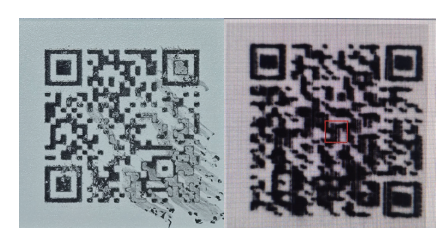
Figure 2: QR code with a paste pattern
(2) Core causes
(1) Inaccurate ink temperature control: UV ink is highly sensitive to temperature. If the ink temperature is too high, the ink viscosity droplets decrease, causing the ejected ink droplets to spread and wet the paper excessively; If the ink temperature is too low, the ink flows poorly and the jetting becomes unstable, which can also change the final shape of the ink droplets. Ink temperature fluctuations are a common cause of plate pasting.
(2) Ink droplet volume changes caused by abnormal printhead voltage: Unstable voltage directly causes ink droplet sizes to fluctuate. Large ink droplets falling onto the paper spread over too much area easily adheres to adjacent modules, forming a paste plate.
(3) Insufficient UV curing energy: When the ink layer is not fully cured, even slight vibrations or airflow disturbances from the paper cause micro-flow of ink that has not dried, leading to blurred boundaries and module adhesion.
(4) Surface characteristics of the substrate: Some cigarette pack papers have uneven surface roughness or absorbency, especially when the solid layer of white ink primer is uneven. Subsequent printed QR code ink may diffuse or penetrate along the micro-texture of the base layer, visually intensifying the impression of smudging.
White lines, black lines, and pasted plate issues
Handling measures
To address the above causes, the following provides specific and operable quality problem handling measures from four aspects: process parameters, curing system, environmental control, and standard maintenance procedures.
01/ Precise control of core nozzle parameters
(1) Adjust the adaptability of the nozzle drive voltage
Printhead voltage is the primary factor affecting the ink droplet ejection form and drop accuracy.
(1) Standard Reference: Based on the rated voltage set by the printhead manufacturer, usually set 90% of the rated value as the starting point. For most industrial printheads, this value is about 85~95V.
(2) White line treatment strategy: After confirming non-physical blockage, the voltage can be appropriately increased by 2%~3%. Moderately increasing energy helps the ink overcome resistance caused by slight dry density, making inkjet flow smoother. However, the amplification should not be too large at once; it should be fine-tuned in steps of 0.5V.
(3) Black line handling strategy: Reduce the voltage by 1%~2% from the standard value. Lowering the voltage can effectively decrease the number of satellite dots of the main ink droplet and the dispersion range of ink droplets in the air, thereby suppressing the black lines. Minor fine-tuning is also required.
(4) Paste Processing Strategy: The premise for solving paste is to stabilize the droplet volume. Therefore, the voltage must be strictly controlled within ±1% of its optimal set point to reduce volume inconsistency caused by fluctuations.
(5) Verification requirements: After each voltage adjustment, at least 10~15 printed products must be continuously observed to confirm that the printing status is fully stable from the moment of adjustment before continuing mass production.
(2) Nozzle temperature setting
(1) Standard control range: The nozzle temperature should be controlled at 45±3°C.
(2) White line tendency adjustment: When environmental conditions cause ink viscosity to be low or white lines appear frequently, the temperature can be set to a lower limit (42~45°C). Appropriately lowering the temperature can moderately increase ink viscosity, improve the breakage of ink droplets at the nozzle, and make the injection more stable.
(3) Glue tendency adjustment: When the glue trend occurs, set the temperature above the upper limit (45~48°C) to reduce viscosity and promote controlled leveling of ink droplets on the paper surface. At the same time, UV curing capability must be confirmed simultaneously.
(3) Dynamic optimization of printing distance
The distance from the printhead to the paper surface directly affects the ink droplet travel time and placement accuracy.
(1) Standard setting: 2.0±0.3mm.
(2) Black line processing: Appropriately increase the distance to 2.2~2.5mm. A larger distance allows fine satellite droplets to deflect more noticeably during flight, further separating from the main droplet, making them less obvious in the image. At the same time, increasing the distance reduces the risk of paper shaking or direct brushing of the printhead surface, but excessive distance causes the ink droplet to scatter at the landing point.
(3) White line treatment: Accurately calibrate and appropriately reduce the distance to 1.8~2.0mm to shorten the ink droplet travel time, ensure it lands precisely in the designated position, and reduce drop point deviation caused by airflow and other factors.
02/ Matching curing system energy and speed
(1) UV curing energy grading control
(1) Black lines and trailing special: When black lines or blurry pattern edges are detected, the first measure is to assess and increase UV curing energy, increasing by 10~20 mJ/cm² each time. The goal is to ensure that ink droplets are "locked" upon landing, losing fluidity and avoiding stringing or sticking.
(2) Paste Special: Ensure the curing energy meets the standard value recommended by the ink manufacturer. In practice, use a UV energy meter to measure on the paper feed plane to ensure the substrate surface receives sufficient and uniform energy.
(3) White line accompanying phenomenon: If white line issues are accompanied by insufficient gloss and poor adhesion in the overall pattern, it is highly suspected that the UV lamp is aging and causing pseudo-dry clogging-ink that has not dried and adheres to the printhead surface, causing blockage due to prolonged drying. At this point, the actual output energy of the UV lamp should be measured immediately and a decision made before replacing the lamp.
(2) Dynamic adaptation of curing speed
It is necessary to ensure that the curing speed and printing speed are strictly matched. When the printing machine slows down due to other process requirements, the paper stays longer under the UV lamp, which may cause the total energy received by the ink layer to become too high, causing brittleness or shrinkage. At this point, a linkage program should be activated, and the UV lamp power level should be adjusted automatically or manually.
03/ Precise control of the production environment
(1) Static and dynamic temperature requirements
Set the workshop temperature to 25±3°C. Not only should you check the air conditioning display temperature, but also monitor the microclimate near the coding equipment, avoiding direct cold air or heat source baking to prevent ink viscosity fluctuations caused by local temperature differences.
(2) Humidity and energy state balance
Relative humidity should be controlled between 50% ±10% RH. High-humidity environments not only delay ink drying but may also alter the paper's conductivity and moisture content, affecting the electrostatic deflection and absorption and penetration of ink droplets, so regular maintenance of dehumidification equipment is required.
(3) Cleanliness assurance
Clean zone management should be established in the coding section to maintain a cleanliness level of 100,000. Measures such as installing positive pressure air supply, regular dust removal on floors, and changing shoes in and out can minimize dust and paper scraps in the air.
04/ Standardized sprinkler cleaning and maintenance plan
(1) Daily three-level maintenance system
(1) Before startup (activation): Execute the machine's preset automatic cleaning program, print test strips, and check whether all nozzle ink lines are continuous, complete, and accurately positioned.
(2) During production (inspection): Every 2 hours, operators use specialized gauges to check the print head surface. If ink droplets accumulate or paper scraps are found, immediately use a dust-free cloth to blow off the spray without contact or gently wipe in one direction.
(3) After shutdown (sealing): Perform the shutdown cleaning procedure and cover the printhead moisturizing component to prevent ink inside the nozzle from drying out. After shutdown, clean and protect the printhead, as shown in Figure 3.
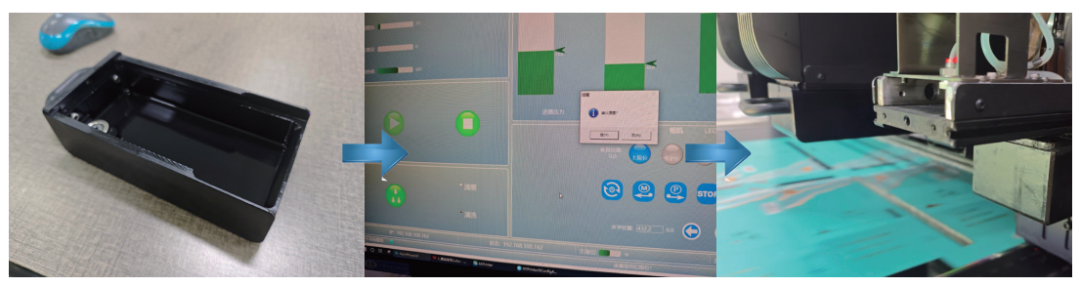
Figure 3: Cleaning and protecting the nozzle after shutdown
(2) Emergency handling procedures by degree
(1) Mild clogging (slight white lines): perform three automatic cleanings, and resume production after the test strip is normal.
(2) Moderate blockage (persistent white lines): Production is suspended, a dust-free cloth dipped in a special cleaning solution is used, and gentle physical cleaning of the nozzle surface is performed in one direction (strictly prohibited from wiping back and forth). Repeated wiping will force dry particles to repeatedly scrape the edges of the precision nozzle, causing permanent damage.
(3) Severe blockage (large white lines or partial blockage): Immediately stop the machine, have professional maintenance personnel remove the nozzle, place it in a pure precision ultrasonic cleaner, clean with the designated nozzle cleaning solution for 10~15 minutes, then dry thoroughly and reinstall and debug. After installation, it still needs several tens of minutes of stable voltage and temperature before production can proceed.
(3) Black line emergency handling special operations
(1) Cleaning and troubleshooting: First, check and clean the surface of the printhead and its surrounding protective covers and metal baffles, removing any ink splatter and ink accumulation. Use a dust-free cloth dipped in cleaning solution to gently wipe the printhead surface in one direction.
(2) Quick parameter adjustment: If only partial improvement or remains, the nozzle voltage can be reduced by 1%~2% simultaneously after cleaning, and the satellite point elimination status can be observed.
(4) Prohibitions and principles
(1) Three strict prohibitions: It is strictly forbidden to force production when the printhead is blocked, to avoid damaging the piezoelectric crystal; It is strictly forbidden to use sharp objects to touch the nozzle; It is strictly forbidden for non-professionals to disassemble the printhead circuit on their own.
(2) One-way wiping rule: All wiping involving physical contact with the nozzle surface must strictly follow the one-way one-pass operating procedure.
(3) Principle of abnormal cleaning frequency: If it is determined that each shift has more than 5 cleanings, it should be considered abnormal ink cleanliness or environmental cleanliness. Ink samples must be taken for inspection and the ink supply filtration system checked.
Intelligent production process and graded quality control
01/ Precise setup of online visual inspection systems
To cope with high-speed production, it is essential to configure a highly sensitive online visual inspection system capable of automatic learning and grading judgment. Its parameters and strategy recommendations are as follows:
(1) White Line Detection: Set sensitivity for linear impurity detection. When the alarm threshold is set to >0.1mm in width and >1.5mm in length, the alarm will be triggered and the machine will stop, pending manual confirmation.
(2) Black line and trailing detection: Set contrast difference detection; automatic removal starts when black line length >2mm; Tailing area > automatic removal when the total module area is 20%.
(3) Binding between glue plate and symbol grade: The system must calculate the symbol grade of the QR code in real time. If the symbol level < 2.5 caused by the base reflectance, modulation ratio, etc., it is automatically removed; if the module adhesion ratio exceeds 5%, an automatic alarm and prompt to check the UV curing module. (4) Registration deviation monitoring: When the position deviation of the QR code relative to the fixed color mark >0.3mm, the system automatically alarms and feeds the paper operation information back to the machine for adjustment and correction.
02/ Dual-channel manual sampling and quality traceability
(1) Upper channel (sampling flow)
Each hour, inspectors randomly sample at a 15% ratio, using multiple mobile phones and dedicated handheld terminals to simulate terminal users scanning codes. Only after passing the trial reading can the device be released.
(2) Lower channel (full inspection flow)
Quality inspectors conduct 100% rapid visual inspection of the entire batch of products off the line, stamping the staff seal. Afterwards, another quality inspector uses automatic passing equipment to re-verify all inspected products to ensure no errors or omissions.
Full-chain quality traceability: Establish an electronic file corresponding one-to-one with "machine number - production shift - paper roll number - process parameter record." When quality issues are found, it can immediately trace specific parameters such as nozzle temperature, voltage, and ambient temperature and humidity at that time, providing a data loop for cause analysis.
03/ Quick handling of common issues
Common issues and standard handling procedures are shown in Table 1.
Table 1: Common Issues and Standard Handling Procedures
Malfunction Symptoms Initial Cause Assessment Standard Handling Procedure Estimated Time (minutes)
Sudden White Line Nozzle Clogging Automatic cleaning → one-way wiping → ultrasonic cleaning 5~15
Periodic Black Line Nozzle Surface Contamination Clean nozzle surface → clean surrounding area → reduce voltage by 1%~2% 3~5
Edge Smudging UV Curing Insufficient Immediately Increase UV Energy → Simultaneously Check Lamp Life Immediate Effect
Overall Blurriness Voltage/Distance Changes Check and Calibrate Voltage → Recalibrate Print Head Distance 5~10
Registration Offset Tension/Alignment Abnormalities Real-Time Micro-Adjustment of Tension Parameters → Check Paper 10~15
Feeding and Alignment System
Summary and Building a Long-Term System
The control of QR code quality on cigarette packs using high-speed single-sheet inkjet printers has evolved from simple equipment tuning to a comprehensive, systematic capability. The key to addressing issues like black lines and white lines lies in building a four-in-one long-term system.
01/ Lean Optimization of Parameters
Focusing on printhead voltage, temperature, and paper distance, establish a database of the best parameter combinations for each type of paper and ink used in the company, and create a micro-adjustment guide card.
02/ Discipline in Operation and Maintenance
Turn "one-way wiping, regular maintenance, standardized operation" from a requirement into muscle memory. Through training and foolproof design, eliminate human factors that could damage printheads – this is the foundation for long-term quality stability.
03/ Intelligent Detection and Response
Use online visual inspection as a real-time data source, combined with manual spot checks, to establish a minute-level rapid response mechanism of "stop when an alarm occurs, identify the cause, and implement corrective measures."
04/ Ensuring a Preventive Basic Environment
Investing in a constant temperature and humidity clean environment, along with institutionalized pre-treatment of paper, forms the foundation of all quality work. Its value becomes fully apparent in long-term, large-scale production.
By implementing these systematic measures together, core quality problems like black lines, white lines, and smudging on high-speed single-sheet inkjet printers can be effectively resolved. This ensures stable compliance with the strict standards for cigarette pack QR codes and strongly safeguards the company's production efficiency and business reputation.